
Iosevka 
Iosevka is an open-source, sans-serif + slab-serif, monospace + quasi‑proportional typeface family, designed for writing code, using in terminals, and preparing technical documents.

Installation
Quit your editor/program. Unzip and open the folder.
-
Windows: Download the fonts from the Releases, select the font files and right click, then hit “Install”.
- On Windows 10 1809 or newer the default font installation is per-user, and it may cause compatibility issues for some applications, mostly written in Java. To cope with this, right click and select “Install for all users” instead. Ref.
-
- Standard distribution in Homebrew:
brew tap homebrew/cask-fonts brew install --cask font-iosevka - Search for other variants using
brew search font-iosevkaand install what you want. - Customizable install using Homebrew: see robertgzr/homebrew-tap.
- Standard distribution in Homebrew:
-
Linux : Copy the TTF files to your fonts directory → Run
sudo fc-cache.- Arch Linux users can install one of the ttc-iosevka packages.
- Void Linux users can install the font with
xbps-install font-iosevka. - Fedora Linux users can install the font(s) from the copr here. Run
dnf search iosevkato discover available fonts anddnf installto install the chosen one(s).
-
FreeBSD: The font can be installed with
pkg install iosevka. -
OpenBSD: Run
pkg_info -Q iosevkato see which Iosevka packages are available. Usepkg_addto install the chosen package(s).
Features
In the official package, Iosevka provides 6 monospace subfamilies (sans-serif and slab-serif, each in the 3 spacings Default, Term and Fixed) and 2 quasi-proportional subfamilies (Aile (sans-serif) and Etoile (slab-serif)). In all the monospace subfamilies, 9 weights (Thin to Heavy), 2 widths (Normal and Extended), and 3 slopes (Upright, Italic and Oblique) are included. In the quasi-proportional subfamilies, the quantity of widths is reduced to 1.

All versions include the same ranges of characters: Latin letters, Greek letters (including Polytonic), some Cyrillic letters, IPA symbols and common punctuations and some symbols. You can check out the full list here.

161 Supported Languages:
Afrikaans, Aghem, Akan, Albanian, Asturian, Asu, Azerbaijani, Bafia, Bambara, Basaa, Basque, Belarusian, Bemba, Bena, Bosnian, Breton, Bulgarian, Catalan, Cebuano, Central Atlas Tamazight, Chechen, Chiga, Colognian, Cornish, Croatian, Czech, Danish, Duala, Dutch, Embu, English, Esperanto, Estonian, Ewe, Ewondo, Faroese, Filipino, Finnish, French, Friulian, Fulah, Galician, Ganda, German, Greek, Gusii, Hausa, Hawaiian, Hungarian, Icelandic, Igbo, Inari Sami, Indonesian, Interlingua, Irish, Italian, Javanese, Jola-Fonyi, Kabuverdianu, Kabyle, Kako, Kalaallisut, Kalenjin, Kamba, Kazakh, Kikuyu, Kinyarwanda, Koyra Chiini, Koyraboro Senni, Kurdish, Kwasio, Kyrgyz, Lakota, Langi, Latvian, Lingala, Lithuanian, Low German, Lower Sorbian, Luba-Katanga, Luo, Luxembourgish, Luyia, Macedonian, Machame, Makhuwa-Meetto, Makonde, Malagasy, Malay, Maltese, Manx, Maori, Masai, Meru, Metaʼ, Mongolian, Morisyen, Mundang, Nama, Ngiemboon, Nigerian Pidgin, North Ndebele, Northern Sami, Norwegian, Norwegian Bokmål, Norwegian Nynorsk, Nuer, Nyankole, Oromo, Ossetic, Polish, Portuguese, Quechua, Romanian, Romansh, Rombo, Rundi, Russian, Rwa, Sakha, Samburu, Sango, Sangu, Scottish Gaelic, Sena, Serbian, Shambala, Shona, Slovak, Slovenian, Soga, Somali, Spanish, Sundanese, Swahili, Swedish, Swiss German, Tachelhit (shi_latn), Taita, Tajik, Tasawaq, Tatar, Teso, Tongan, Turkish, Turkmen, Ukrainian, Upper Sorbian, Uzbek, Vai (vai_latn), Vietnamese, Vunjo, Walser, Welsh, Western Frisian, Wolof, Xhosa, Yangben, Yoruba, Zarma, Zulu
Stylistic Sets
Monospace Iosevka contains various stylistic sets to change the shape of certain characters. Enabling corresponded OpenType feature to enable.
ss01 — Andale Mono Style |
|
 |
 |
ss02 — Anonymous Pro Style |
|
 |
 |
ss03 — Consolas Style |
|
 |
 |
ss04 — Menlo Style |
|
 |
 |
ss05 — Fira Mono Style |
|
 |
 |
ss06 — Liberation Mono Style |
|
 |
 |
ss07 — Monaco Style |
|
 |
 |
ss08 — Pragmata Pro Style |
|
 |
 |
ss09 — Source Code Pro Style |
|
 |
 |
ss10 — Envy Code R Style |
|
 |
 |
ss11 — X Window Style |
|
 |
 |
ss12 — Ubuntu Mono Style |
|
 |
 |
ss13 — Lucida Style |
|
 |
 |
ss14 — JetBrains Mono Style |
|
 |
 |
ss15 — IBM Plex Mono Style |
|
 |
 |
ss16 — PT Mono Style |
|
 |
 |
ss17 — Recursive Mono Style |
|
 |
 |
ss18 — Input Mono Style |
|
 |
 |
ss20 — Curly Style |
|
 |
 |
Character Variants
Alongside stylistic sets, Monospace Iosevka can also be configured to cherry-pick variants for each character using OpenType. The variants are shown below. To enable, assign the feature tag to the variant index. For example, setting cv26 to 6 will enable single-storey a.
Caution : Certain software may limit the quantity of OpenType features and drop some of them if the feature list is too long. Please validate your feature configuration to ensure that it worked in your software.
cv01 |
 |
 |
 |
 |
 |
 |
 |
 |
||||
| 1 | 2 | 3 | 4 | 5 | 6 | 7 | 8 | |||||
cv02 |
 |
 |
 |
 |
 |
 |
 |
 |
 |
 |
 |
 |
| 1 | 2 | 3 | 4 | 5 | 6 | 7 | 8 | 9 | 10 | 11 | 12 | |
cv03 |
 |
 |
 |
 |
 |
|||||||
| 1 | 2 | 3 | 4 | 5 | ||||||||
cv04 |
 |
 |
 |
 |
 |
 |
||||||
| 1 | 2 | 3 | 4 | 5 | 6 | |||||||
cv05 |
 |
 |
 |
|||||||||
| 1 | 2 | 3 | ||||||||||
cv06 |
 |
 |
 |
|||||||||
| 1 | 2 | 3 | ||||||||||
cv07 |
 |
 |
 |
 |
 |
 |
 |
 |
 |
 |
 |
 |
| 1 | 2 | 3 | 4 | 5 | 6 | 7 | 8 | 9 | 10 | 11 | 12 | |
 |
 |
 |
 |
 |
 |
 |
 |
 |
 |
 |
 |
|
| 13 | 14 | 15 | 16 | 17 | 18 | 19 | 20 | 21 | 22 | 23 | 24 | |
 |
 |
 |
||||||||||
| 25 | 26 | 27 | ||||||||||
cv08 |
 |
 |
 |
 |
||||||||
| 1 | 2 | 3 | 4 | |||||||||
cv09 |
 |
 |
 |
|||||||||
| 1 | 2 | 3 | ||||||||||
cv10 |
 |
 |
 |
 |
 |
 |
 |
 |
 |
 |
 |
 |
| 1 | 2 | 3 | 4 | 5 | 6 | 7 | 8 | 9 | 10 | 11 | 12 | |
 |
 |
|||||||||||
| 13 | 14 | |||||||||||
cv11 |
 |
 |
 |
 |
 |
 |
 |
 |
 |
 |
 |
 |
| 1 | 2 | 3 | 4 | 5 | 6 | 7 | 8 | 9 | 10 | 11 | 12 | |
 |
 |
 |
 |
|||||||||
| 13 | 14 | 15 | 16 | |||||||||
cv12 |
 |
 |
 |
|||||||||
| 1 | 2 | 3 | ||||||||||
cv13 |
 |
 |
 |
 |
 |
 |
 |
 |
||||
| 1 | 2 | 3 | 4 | 5 | 6 | 7 | 8 | |||||
cv14 |
 |
 |
 |
 |
||||||||
| 1 | 2 | 3 | 4 | |||||||||
cv15 |
 |
 |
 |
 |
||||||||
| 1 | 2 | 3 | 4 | |||||||||
cv16 |
 |
 |
 |
 |
 |
 |
 |
 |
||||
| 1 | 2 | 3 | 4 | 5 | 6 | 7 | 8 | |||||
cv17 |
 |
 |
 |
 |
 |
 |
 |
 |
 |
 |
 |
 |
| 1 | 2 | 3 | 4 | 5 | 6 | 7 | 8 | 9 | 10 | 11 | 12 | |
cv18 |
 |
 |
 |
 |
 |
|||||||
| 1 | 2 | 3 | 4 | 5 | ||||||||
cv19 |
 |
 |
 |
|||||||||
| 1 | 2 | 3 | ||||||||||
cv20 |
 |
 |
 |
 |
 |
 |
 |
 |
 |
 |
||
| 1 | 2 | 3 | 4 | 5 | 6 | 7 | 8 | 9 | 10 | |||
cv21 |
 |
 |
 |
 |
||||||||
| 1 | 2 | 3 | 4 | |||||||||
cv22 |
 |
 |
 |
 |
 |
 |
 |
 |
 |
 |
 |
 |
| 1 | 2 | 3 | 4 | 5 | 6 | 7 | 8 | 9 | 10 | 11 | 12 | |
cv23 |
 |
 |
 |
 |
 |
 |
||||||
| 1 | 2 | 3 | 4 | 5 | 6 | |||||||
cv24 |
 |
 |
 |
 |
 |
 |
 |
 |
||||
| 1 | 2 | 3 | 4 | 5 | 6 | 7 | 8 | |||||
cv25 |
 |
 |
 |
 |
 |
 |
 |
 |
 |
 |
 |
 |
| 1 | 2 | 3 | 4 | 5 | 6 | 7 | 8 | 9 | 10 | 11 | 12 | |
 |
 |
 |
 |
 |
 |
 |
 |
 |
 |
 |
 |
|
| 13 | 14 | 15 | 16 | 17 | 18 | 19 | 20 | 21 | 22 | 23 | 24 | |
 |
 |
 |
||||||||||
| 25 | 26 | 27 | ||||||||||
cv26 |
 |
 |
 |
 |
 |
 |
 |
 |
 |
 |
 |
 |
| 1 | 2 | 3 | 4 | 5 | 6 | 7 | 8 | 9 | 10 | 11 | 12 | |
 |
 |
|||||||||||
| 13 | 14 | |||||||||||
cv27 |
 |
 |
 |
 |
 |
 |
||||||
| 1 | 2 | 3 | 4 | 5 | 6 | |||||||
cv28 |
 |
 |
 |
 |
 |
|||||||
| 1 | 2 | 3 | 4 | 5 | ||||||||
cv29 |
 |
 |
 |
 |
 |
 |
 |
 |
 |
|||
| 1 | 2 | 3 | 4 | 5 | 6 | 7 | 8 | 9 | ||||
cv30 |
 |
 |
||||||||||
| 1 | 2 | |||||||||||
cv31 |
 |
 |
 |
 |
 |
 |
 |
 |
 |
 |
 |
 |
| 1 | 2 | 3 | 4 | 5 | 6 | 7 | 8 | 9 | 10 | 11 | 12 | |
 |
 |
 |
 |
 |
 |
 |
 |
|||||
| 13 | 14 | 15 | 16 | 17 | 18 | 19 | 20 | |||||
cv32 |
 |
 |
 |
 |
 |
 |
 |
 |
 |
 |
||
| 1 | 2 | 3 | 4 | 5 | 6 | 7 | 8 | 9 | 10 | |||
cv33 |
 |
 |
 |
 |
 |
|||||||
| 1 | 2 | 3 | 4 | 5 | ||||||||
cv34 |
 |
 |
 |
 |
 |
 |
 |
 |
 |
 |
 |
 |
| 1 | 2 | 3 | 4 | 5 | 6 | 7 | 8 | 9 | 10 | 11 | 12 | |
cv35 |
 |
 |
 |
 |
 |
 |
 |
 |
||||
| 1 | 2 | 3 | 4 | 5 | 6 | 7 | 8 | |||||
cv36 |
 |
 |
 |
 |
 |
 |
 |
 |
 |
 |
 |
 |
| 1 | 2 | 3 | 4 | 5 | 6 | 7 | 8 | 9 | 10 | 11 | 12 | |
 |
 |
 |
 |
 |
 |
 |
 |
 |
 |
 |
 |
|
| 13 | 14 | 15 | 16 | 17 | 18 | 19 | 20 | 21 | 22 | 23 | 24 | |
 |
 |
 |
||||||||||
| 25 | 26 | 27 | ||||||||||
cv37 |
 |
 |
 |
 |
 |
 |
 |
 |
 |
 |
 |
 |
| 1 | 2 | 3 | 4 | 5 | 6 | 7 | 8 | 9 | 10 | 11 | 12 | |
cv38 |
 |
 |
 |
 |
 |
 |
 |
 |
 |
 |
 |
 |
| 1 | 2 | 3 | 4 | 5 | 6 | 7 | 8 | 9 | 10 | 11 | 12 | |
 |
 |
 |
 |
 |
 |
 |
 |
 |
 |
|||
| 13 | 14 | 15 | 16 | 17 | 18 | 19 | 20 | 21 | 22 | |||
cv39 |
 |
 |
 |
 |
 |
 |
 |
 |
 |
|||
| 1 | 2 | 3 | 4 | 5 | 6 | 7 | 8 | 9 | ||||
cv40 |
 |
 |
 |
 |
||||||||
| 1 | 2 | 3 | 4 | |||||||||
cv41 |
 |
 |
 |
 |
 |
 |
 |
 |
 |
 |
 |
 |
| 1 | 2 | 3 | 4 | 5 | 6 | 7 | 8 | 9 | 10 | 11 | 12 | |
cv42 |
 |
 |
 |
 |
 |
 |
 |
 |
 |
 |
 |
 |
| 1 | 2 | 3 | 4 | 5 | 6 | 7 | 8 | 9 | 10 | 11 | 12 | |
 |
 |
 |
 |
|||||||||
| 13 | 14 | 15 | 16 | |||||||||
cv43 |
 |
 |
 |
 |
 |
|||||||
| 1 | 2 | 3 | 4 | 5 | ||||||||
cv44 |
 |
 |
 |
 |
 |
 |
 |
 |
 |
 |
 |
 |
| 1 | 2 | 3 | 4 | 5 | 6 | 7 | 8 | 9 | 10 | 11 | 12 | |
 |
 |
 |
||||||||||
| 13 | 14 | 15 | ||||||||||
cv45 |
 |
 |
 |
 |
 |
 |
 |
 |
 |
|||
| 1 | 2 | 3 | 4 | 5 | 6 | 7 | 8 | 9 | ||||
cv46 |
 |
 |
 |
 |
 |
 |
||||||
| 1 | 2 | 3 | 4 | 5 | 6 | |||||||
cv47 |
 |
 |
 |
 |
 |
 |
 |
 |
 |
 |
 |
 |
| 1 | 2 | 3 | 4 | 5 | 6 | 7 | 8 | 9 | 10 | 11 | 12 | |
 |
 |
|||||||||||
| 13 | 14 | |||||||||||
cv48 |
 |
 |
 |
 |
 |
 |
 |
|||||
| 1 | 2 | 3 | 4 | 5 | 6 | 7 | ||||||
cv49 |
 |
 |
 |
 |
 |
 |
 |
 |
 |
 |
 |
 |
| 1 | 2 | 3 | 4 | 5 | 6 | 7 | 8 | 9 | 10 | 11 | 12 | |
cv50 |
 |
 |
 |
 |
 |
 |
 |
 |
 |
 |
 |
 |
| 1 | 2 | 3 | 4 | 5 | 6 | 7 | 8 | 9 | 10 | 11 | 12 | |
 |
 |
 |
 |
 |
 |
 |
 |
 |
 |
 |
 |
|
| 13 | 14 | 15 | 16 | 17 | 18 | 19 | 20 | 21 | 22 | 23 | 24 | |
 |
 |
 |
||||||||||
| 25 | 26 | 27 | ||||||||||
cv51 |
 |
 |
 |
 |
 |
 |
||||||
| 1 | 2 | 3 | 4 | 5 | 6 | |||||||
cv52 |
 |
 |
 |
 |
 |
 |
 |
 |
 |
 |
 |
 |
| 1 | 2 | 3 | 4 | 5 | 6 | 7 | 8 | 9 | 10 | 11 | 12 | |
cv53 |
 |
 |
||||||||||
| 1 | 2 | |||||||||||
cv54 |
 |
 |
||||||||||
| 1 | 2 | |||||||||||
VXAA |
 |
 |
||||||||||
| 1 | 2 | |||||||||||
cv55 |
 |
 |
 |
|||||||||
| 1 | 2 | 3 | ||||||||||
cv56 |
 |
 |
 |
 |
 |
 |
||||||
| 1 | 2 | 3 | 4 | 5 | 6 | |||||||
cv57 |
 |
 |
 |
 |
||||||||
| 1 | 2 | 3 | 4 | |||||||||
VXAC |
 |
 |
||||||||||
| 1 | 2 | |||||||||||
VXAB |
 |
 |
||||||||||
| 1 | 2 | |||||||||||
cv58 |
 |
 |
 |
 |
 |
|||||||
| 1 | 2 | 3 | 4 | 5 | ||||||||
cv59 |
 |
 |
 |
 |
 |
|||||||
| 1 | 2 | 3 | 4 | 5 | ||||||||
cv60 |
 |
 |
 |
 |
 |
 |
 |
 |
 |
 |
 |
 |
| 1 | 2 | 3 | 4 | 5 | 6 | 7 | 8 | 9 | 10 | 11 | 12 | |
 |
 |
 |
 |
|||||||||
| 13 | 14 | 15 | 16 | |||||||||
cv61 |
 |
 |
 |
 |
 |
 |
 |
 |
 |
 |
 |
 |
| 1 | 2 | 3 | 4 | 5 | 6 | 7 | 8 | 9 | 10 | 11 | 12 | |
 |
 |
 |
 |
|||||||||
| 13 | 14 | 15 | 16 | |||||||||
cv62 |
 |
 |
||||||||||
| 1 | 2 | |||||||||||
cv63 |
 |
 |
 |
 |
 |
 |
 |
|||||
| 1 | 2 | 3 | 4 | 5 | 6 | 7 | ||||||
cv64 |
 |
 |
 |
 |
||||||||
| 1 | 2 | 3 | 4 | |||||||||
cv65 |
 |
 |
||||||||||
| 1 | 2 | |||||||||||
cv66 |
 |
 |
 |
 |
 |
 |
||||||
| 1 | 2 | 3 | 4 | 5 | 6 | |||||||
cv67 |
 |
 |
 |
 |
 |
 |
||||||
| 1 | 2 | 3 | 4 | 5 | 6 | |||||||
cv68 |
 |
 |
 |
 |
 |
 |
 |
 |
 |
 |
 |
 |
| 1 | 2 | 3 | 4 | 5 | 6 | 7 | 8 | 9 | 10 | 11 | 12 | |
cv69 |
 |
 |
 |
|||||||||
| 1 | 2 | 3 | ||||||||||
cv70 |
 |
 |
 |
 |
 |
 |
||||||
| 1 | 2 | 3 | 4 | 5 | 6 | |||||||
cv71 |
 |
 |
 |
 |
 |
 |
 |
 |
 |
 |
||
| 1 | 2 | 3 | 4 | 5 | 6 | 7 | 8 | 9 | 10 | |||
cv72 |
 |
 |
 |
 |
 |
 |
 |
|||||
| 1 | 2 | 3 | 4 | 5 | 6 | 7 | ||||||
cv73 |
 |
 |
||||||||||
| 1 | 2 | |||||||||||
cv74 |
 |
 |
||||||||||
| 1 | 2 | |||||||||||
cv75 |
 |
 |
 |
 |
 |
 |
||||||
| 1 | 2 | 3 | 4 | 5 | 6 | |||||||
cv76 |
 |
 |
||||||||||
| 1 | 2 | |||||||||||
cv77 |
 |
 |
 |
|||||||||
| 1 | 2 | 3 | ||||||||||
cv78 |
 |
 |
 |
 |
 |
 |
 |
 |
 |
 |
 |
 |
| 1 | 2 | 3 | 4 | 5 | 6 | 7 | 8 | 9 | 10 | 11 | 12 | |
cv79 |
 |
 |
 |
|||||||||
| 1 | 2 | 3 | ||||||||||
cv80 |
 |
 |
 |
|||||||||
| 1 | 2 | 3 | ||||||||||
cv81 |
 |
 |
||||||||||
| 1 | 2 | |||||||||||
cv82 |
 |
 |
 |
 |
 |
 |
 |
 |
||||
| 1 | 2 | 3 | 4 | 5 | 6 | 7 | 8 | |||||
cv83 |
 |
 |
 |
|||||||||
| 1 | 2 | 3 | ||||||||||
cv84 |
 |
 |
||||||||||
| 1 | 2 | |||||||||||
cv85 |
 |
 |
 |
|||||||||
| 1 | 2 | 3 | ||||||||||
cv86 |
 |
 |
 |
|||||||||
| 1 | 2 | 3 | ||||||||||
cv87 |
 |
 |
 |
|||||||||
| 1 | 2 | 3 | ||||||||||
cv88 |
 |
 |
 |
 |
 |
 |
 |
 |
||||
| 1 | 2 | 3 | 4 | 5 | 6 | 7 | 8 | |||||
cv89 |
 |
 |
 |
 |
 |
 |
 |
|||||
| 1 | 2 | 3 | 4 | 5 | 6 | 7 | ||||||
cv90 |
 |
 |
 |
 |
 |
|||||||
| 1 | 2 | 3 | 4 | 5 | ||||||||
cv91 |
 |
 |
 |
 |
 |
 |
||||||
| 1 | 2 | 3 | 4 | 5 | 6 | |||||||
cv92 |
 |
 |
 |
|||||||||
| 1 | 2 | 3 | ||||||||||
cv93 |
 |
 |
 |
 |
||||||||
| 1 | 2 | 3 | 4 | |||||||||
cv94 |
 |
 |
||||||||||
| 1 | 2 | |||||||||||
cv95 |
 |
 |
||||||||||
| 1 | 2 | |||||||||||
cv96 |
 |
 |
||||||||||
| 1 | 2 | |||||||||||
cv97 |
 |
 |
 |
|||||||||
| 1 | 2 | 3 | ||||||||||
cv98 |
 |
 |
 |
|||||||||
| 1 | 2 | 3 | ||||||||||
cv99 |
 |
 |
||||||||||
| 1 | 2 | |||||||||||
Ligations
Monospace subfamilies support ligations. Iosevka’s default ligation set is assigned to calt feature, though not all of them are enabled by default.
calt off |
Ligation Off |
 |
|
calt |
Default setting in text editors |
 |
|
Iosevka supports Language-Specific Ligations, which is the ligation set enabled only under certain languages. These ligation sets are assigned to custom feature tags. To use them, you need to turn off calt and enable the corresponded feature. The feature list is:
dlig |
Discretionary ligatures |
 |
|
CLIK; JSPT; PHPX |
C-Like, JavaScript, PHP |
 |
|
MLXX; FSHP |
ML, F# |
 |
|
FSTA |
F* |
 |
|
HSKL; IDRS; ELMX; PURS |
Haskell, Idris, Elm, PureScript |
 |
|
SWFT |
Swift |
 |
|
COQX |
Coq |
 |
|
MTLB |
Matlab |
 |
|
VRLG |
Verilog |
 |
|
WFLM |
Wolfram Language (Mathematica) |
 |
|
Please note that, due to the complex interactions when forming ligations, cherry-picking ligation groups will require a custom Iosevka build. The instructions could be seen below.
Building from Source
To build Iosevka you should:
- Ensure that
nodejs(≥ 12.16.0) andttfautohintare present, and accessible fromPATH. - Run
npm install. This command will install all the NPM dependencies, and will also validate whether external dependencies are present. npm run build -- contents::iosevka.
You will find TTFs, as well as WOFF(2) web fonts and one Webfont CSS in the dist/ directory.
Using a Docker container
A Docker container handling the build environment for you can be found here.
To pull it from Docker Hub and start a standard build of the latest released version, run
docker run -it -v $(pwd):/build avivace/iosevka-build
Fonts files will be placed in the dist folder.
You can provide private-build.plans.toml for a customized build and/or specify the desired release appending -e FONT_VERSION=X.X.X. to the Docker command.
Customized Build
To create a custom build, you need:
-
Create
private-build-plans.tomlfile if absent. -
Add a build plan into
private-build-plans.toml. The configurable properties are described in the following sections. -
Run
npm run build -- contents::<your plan name>and the built fonts would be available indist/. Aside fromcontents::<plan>, other options are:contents::<plan>: TTF (Hinted and Unhinted), WOFF(2) and Web font CSS;ttf::<plan>: TTF;ttf-unhinted::<plan>: Unhinted TTF only;webfont::<plan>: Web fonts only (CSS + WOFF2);woff2::<plan>: WOFF2 only.
Configuring Custom Build
Configuration of build plans are organized under [buildPlans.<plan name>] sections in the private-build-plans.toml. You can use the Customizer to create the build plan, and/or manually edit them, following the instructions below.
Inside the plan, top-level properties include:
family: String, defines the family name of your custom variant.spacing: Optional, String, denotes the spacing of the custom variant. Valid values include:quasi-proportional: The font will become quasi-proportional.term: Make the symbols' width suitable for terminal emulators. Arrows and geometric symbols will become narrower.fontconfig-mono: Applytermspacing changes and further apply changes to be compatible with FontConfig's Mono spacing, which recognizes a font as monospace if and only if its every non-combining characters having the same width. The changes include:- Completely remove wide glyphs. All non-combining glyphs will be exactly the same width.
- As a consequence, the following characters will be removed:
U+27F5LONG LEFTWARDS ARROWU+27F6LONG RIGHTWARDS ARROW
- As a consequence, the following characters will be removed:
- Completely remove wide glyphs. All non-combining glyphs will be exactly the same width.
fixed: Applyfontconfig-monochanges and further remove ligations.
serifs: Optional, String, configures style of serifs.- When set to
slab, the font will be converted into slab-serif. - Otherwise the font will be sans-serif.
- When set to
no-cv-ss: Optional, Boolean, disablescv##andss##OpenType features.no-ligation: Optional, Boolean, disables ligations.export-glyph-names: Optional, Boolean, whether to export glyph names into the fonts. Setting this totruewill increase file footprint, however this is necessary for ligature support in Kitty.
Build plan could have 5 optional subsections: ligations, variants, weights, widths and slopes.
Configuring Ligations
Subsection ligations is used to customize the ligation set assigned to calt OpenType feature. Properties include:
-
inherits: Optional, String, defines the inherited ligation set. When absent, the ligation set will not inherit any other sets. Valid values are:default-calt: Inherit default ligation set.dlig: Default ligation set would be assigned to Discretionary ligatures.clike: Default ligation set would be assigned to C-Like.javascript: Default ligation set would be assigned to JavaScript.php: Default ligation set would be assigned to PHP.ml: Default ligation set would be assigned to ML.fsharp: Default ligation set would be assigned to F#.fstar: Default ligation set would be assigned to F*.haskell: Default ligation set would be assigned to Haskell.idris: Default ligation set would be assigned to Idris.elm: Default ligation set would be assigned to Elm.purescript: Default ligation set would be assigned to PureScript.swift: Default ligation set would be assigned to Swift.coq: Default ligation set would be assigned to Coq.matlab: Default ligation set would be assigned to Matlab.verilog: Default ligation set would be assigned to Verilog.wolfram: Default ligation set would be assigned to Wolfram Language (Mathematica).
-
disablesandenables: Optional, String Array, Cherry-picking ligation groups to be disabled or enabled. Valid values include:center-ops: Vertically align some of the operators (like*) to the center position it is before or after a "center" operator (like+).arrow: Enable ligation set that forms arrows.arrow2: Enable ligation for more arrows, like>>=.trig: Enable ligation for<|,|>,<||, and other bar-and-angle-bracket symbols.eqeqeq: Enable special ligation for===with triple lines.eqeq: Enable ligation for==and===.ineq: Enable ligation for<=and>=.exeqeq: Enable special ligation for!==with triple lines.exeqeq-dotted: Enable special ligation for!==with triple lines, and a dot at below for distinction.eqexeq: Enable special ligation for=!=with triple lines.eqexeq-dotted: Enable special ligation for=!=with triple lines and a dot at below for distinction.eqexeq-dl: Enable special ligation for=!=with double lines.eqexeq-dl-dotted: Enable special ligation for=!=with double lines, and a dot at below for distinction.exeq: Enable ligation for!=and!==.exeq-dotted: Enable ligation for!=and!==with a dot at below for distinction.tildeeq: Enable ligation for~=as inequality.eqslasheq: Enable special triple-line ligation for=/=as inequality.slasheq: Enable ligation for/=and=/=as inequality.ltgt-ne: Enable ligation for<>as inequality.ltgt-diamond: Enable ligation for<>as diamond.brst: Center asterisk in(*and*).plusplus: Enable ligation for++and further plus-chaining.kern-dotty: Move connecting dotty punctuations closer, like for::,:::and....kern-bars: Move consecutive bars closer, like for||,|||and//.logic: Enable ligation for/\and\/.llgg: Enable ligation for<<,>>and other angle-bracket chaining.llggeq: Enable ligation for<<=,>>=as shift operator.dot-as-operator: Treat dot (.) as operator and perform chained centering.lteq-as-arrow: Treat<=as arrow.gteq-as-co-arrow: Treat>=as co-arrow.html-comment: Enable ligation for<!--and<!---.colon-greater-as-colon-arrow: Transform:>into:and a narrow arrow.brace-bar: Enable ligation for{|and|}.brack-bar: Enable ligation for[|and|].connected-underscore: Make contiguous underscores (like__) connected.connected-number-sign: Make contiguous number signs (like##) connected.connected-tilde-as-wave: Make contiguous ASCII tildes (like~~) connected as a wave line.connected-hyphen-as-solid-line: Make contiguous hyphen-minuses (like--) connected as a straight solid line.connected-hyphen-as-semi-dashed-line: Make contiguous hyphen-minuses (like--) connected as a straight semi-dashed line, identifying each hyphen component.
Configuring Character Variants
Subsection variants is used to configure character variants in the font. Properties include:
-
inherits: Optional, String, defines the inherited stylistic set. Valid options include:ss01: Set character variant to “Andale Mono Style”.ss02: Set character variant to “Anonymous Pro Style”.ss03: Set character variant to “Consolas Style”.ss04: Set character variant to “Menlo Style”.ss05: Set character variant to “Fira Mono Style”.ss06: Set character variant to “Liberation Mono Style”.ss07: Set character variant to “Monaco Style”.ss08: Set character variant to “Pragmata Pro Style”.ss09: Set character variant to “Source Code Pro Style”.ss10: Set character variant to “Envy Code R Style”.ss11: Set character variant to “X Window Style”.ss12: Set character variant to “Ubuntu Mono Style”.ss13: Set character variant to “Lucida Style”.ss14: Set character variant to “JetBrains Mono Style”.ss15: Set character variant to “IBM Plex Mono Style”.ss16: Set character variant to “PT Mono Style”.ss17: Set character variant to “Recursive Mono Style”.ss18: Set character variant to “Input Mono Style”.ss20: Set character variant to “Curly Style”.
-
design,upright,italic, andoblique: Optional, Dictionary, defines styles for individual characters. The choices are organized in key-value pairs, assigning a variant to a character group. Alternatively, you could assign numbers tocv##tags, like what you did when using OpenType in CSS. Assignments underdesignwill be applied to all the slopes, andupright,italic, andobliquewill apply to corresponded slopes.In addition, style selector for default digit form also uses these dictionaries.
The valid combinations include:
- Default digit form:

digit-form = 'lining'Lining (default) 
digit-form = 'old-style'Old-style - APL form:

apl-form = 'none'Disable APL-specific forms 
apl-form = 'enable'Enable APL-specific forms for operators used in APL to harmonize APL operators - Styles for
A: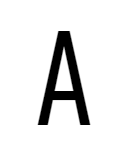
capital-a = 'straight-serifless',cv01 = 1Standard, straight A, without serifs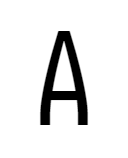
capital-a = 'curly-serifless',cv01 = 2Slightly curly A, like Iosevka 2.x, without serifs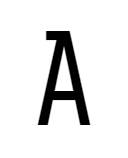
capital-a = 'straight-top-serifed',cv01 = 3Straight Awith serif at top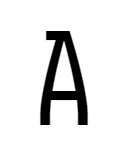
capital-a = 'curly-top-serifed',cv01 = 4Slightly curly A, like Iosevka 2.x, with serif at top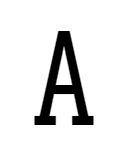
capital-a = 'straight-base-serifed',cv01 = 5Straight Awith serif at both top and bottom
capital-a = 'curly-base-serifed',cv01 = 6Slightly curly A, like Iosevka 2.x, with serif at both top and bottom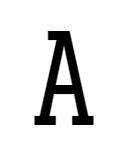
capital-a = 'straight-tri-serifed',cv01 = 7Straight Awith serif at both top and bottom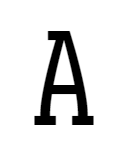
capital-a = 'curly-tri-serifed',cv01 = 8Slightly curly A, like Iosevka 2.x, with serif at both top and bottom - Styles for
B: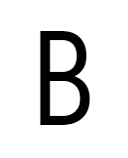
capital-b = 'standard-serifless',cv02 = 1Bin near-symmetric proportion, without serifs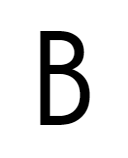
capital-b = 'more-asymmetric-serifless',cv02 = 2Bin more asymmetric proportion to differentiate with8, without serifs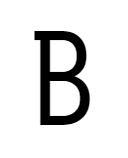
capital-b = 'standard-unilateral-serifed',cv02 = 3Bin near-symmetric proportion with motion serifs at top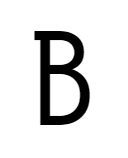
capital-b = 'more-asymmetric-unilateral-serifed',cv02 = 4Bin more asymmetric proportion with motion serifs at top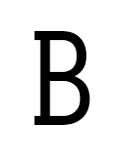
capital-b = 'standard-bilateral-serifed',cv02 = 5Bin near-symmetric proportion with motion serifs at both top and bottom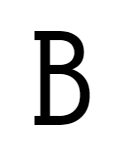
capital-b = 'more-asymmetric-bilateral-serifed',cv02 = 6Bin more asymmetric proportion with motion serifs at both top and bottom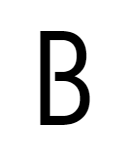
capital-b = 'standard-interrupted-serifless',cv02 = 7Bin near-symmetric proportion with interrupted middle bar, without serifs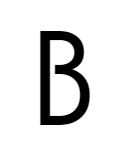
capital-b = 'more-asymmetric-interrupted-serifless',cv02 = 8Bin more asymmetric proportion to differentiate with8, with interrupted middle bar, without serifs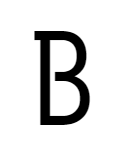
capital-b = 'standard-interrupted-unilateral-serifed',cv02 = 9Bin near-symmetric proportion with interrupted middle bar and motion serifs at top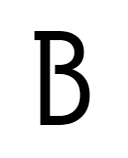
capital-b = 'more-asymmetric-interrupted-unilateral-serifed',cv02 = 10Bin more asymmetric proportion with interrupted middle bar and8with motion serifs at top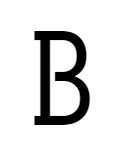
capital-b = 'standard-interrupted-bilateral-serifed',cv02 = 11Bin near-symmetric proportion with interrupted middle bar and motion serifs at both top and bottom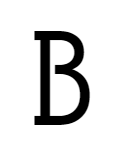
capital-b = 'more-asymmetric-interrupted-bilateral-serifed',cv02 = 12Bin more asymmetric proportion with interrupted middle bar and8with motion serifs at both top and bottom - Styles for
C: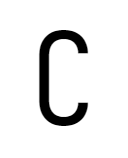
capital-c = 'serifless',cv03 = 1Serifless C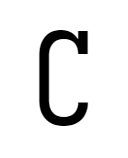
capital-c = 'unilateral-serifed',cv03 = 2Cwith serif at top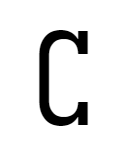
capital-c = 'bilateral-serifed',cv03 = 3Cwith serifs at both top and bottom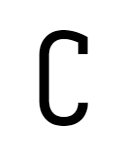
capital-c = 'unilateral-inward-serifed',cv03 = 4Cwith inward serif at top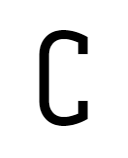
capital-c = 'bilateral-inward-serifed',cv03 = 5Cwith inward serif at both top and bottom - Styles for
D: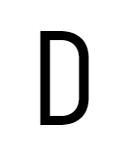
capital-d = 'standard-serifless',cv04 = 1Standard Dwithout serifs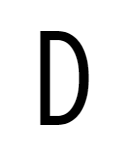
capital-d = 'more-rounded-serifless',cv04 = 2More rounded Dto differentiate withO, without serifs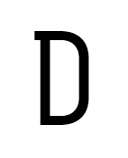
capital-d = 'standard-unilateral-serifed',cv04 = 3Standard Bwith serifs at top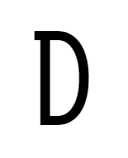
capital-d = 'more-rounded-unilateral-serifed',cv04 = 4More rounded Bto differentiate withOwith motion serifs at top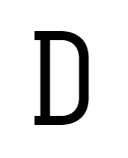
capital-d = 'standard-bilateral-serifed',cv04 = 5Standard Bwith serifs at both top and bottom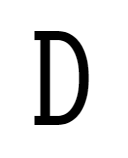
capital-d = 'more-rounded-bilateral-serifed',cv04 = 6More rounded Bto differentiate withOwith serifs at both top and bottom - Styles for
E: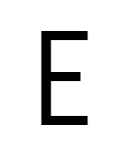
capital-e = 'serifless',cv05 = 1E without serifs 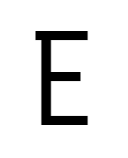
capital-e = 'top-left-serifed',cv05 = 2E with serif only at top left 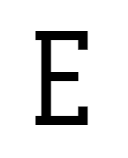
capital-e = 'serifed',cv05 = 3E with serifs - Styles for
F: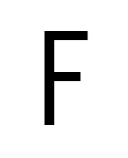
capital-f = 'serifless',cv06 = 1F without serifs 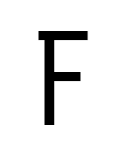
capital-f = 'top-left-serifed',cv06 = 2F with serif only at top left 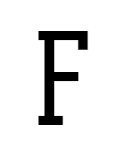
capital-f = 'serifed',cv06 = 3F with serifs - Styles for
G: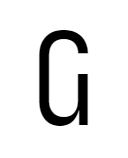
capital-g = 'toothed-serifless-hookless',cv07 = 1Toothed G 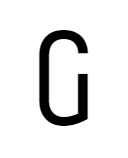
capital-g = 'toothless-corner-serifless-hookless',cv07 = 2Corner toothless G 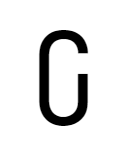
capital-g = 'toothless-rounded-serifless-hookless',cv07 = 3Round toothless G 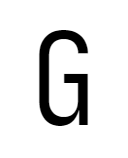
capital-g = 'toothed-serifless-hooked',cv07 = 4Toothed G with inward hook at terminal 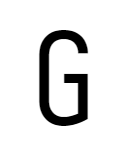
capital-g = 'toothless-corner-serifless-hooked',cv07 = 5Corner toothless G with inward hook at terminal 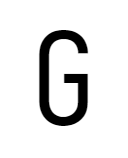
capital-g = 'toothless-rounded-serifless-hooked',cv07 = 6Round toothless G with inward hook at terminal 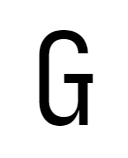
capital-g = 'toothed-serifless-capped',cv07 = 7Toothed G with a cap terminal 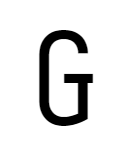
capital-g = 'toothless-corner-serifless-capped',cv07 = 8Corner toothless G with a cap terminal 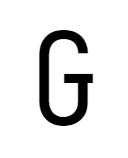
capital-g = 'toothless-rounded-serifless-capped',cv07 = 9Round toothless G with a cap terminal 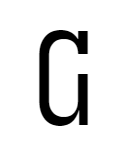
capital-g = 'toothed-serifed-hookless',cv07 = 10Toothed G with top serif 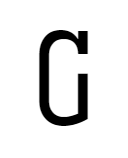
capital-g = 'toothless-corner-serifed-hookless',cv07 = 11Corner toothless G with top serif 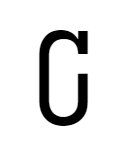
capital-g = 'toothless-rounded-serifed-hookless',cv07 = 12Round toothless G with top serif 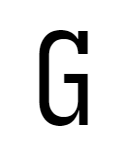
capital-g = 'toothed-serifed-hooked',cv07 = 13Toothed G with inward hook at terminal and top serif 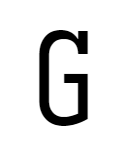
capital-g = 'toothless-corner-serifed-hooked',cv07 = 14Corner toothless G with inward hook at terminal and top serif 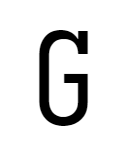
capital-g = 'toothless-rounded-serifed-hooked',cv07 = 15Round toothless G with inward hook at terminal and top serif 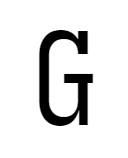
capital-g = 'toothed-serifed-capped',cv07 = 16Toothed G with a cap terminal and top serif 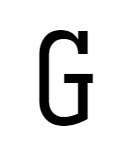
capital-g = 'toothless-corner-serifed-capped',cv07 = 17Corner toothless G with a cap terminal and top serif 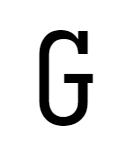
capital-g = 'toothless-rounded-serifed-capped',cv07 = 18Round toothless G with a cap terminal and top serif 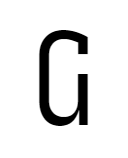
capital-g = 'toothed-inward-serifed-hookless',cv07 = 19Toothed G with inward top serif 
capital-g = 'toothless-corner-inward-serifed-hookless',cv07 = 20Corner toothless G with inward top serif 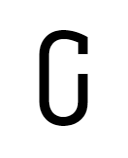
capital-g = 'toothless-rounded-inward-serifed-hookless',cv07 = 21Round toothless G with inward top serif 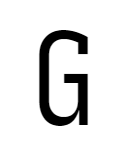
capital-g = 'toothed-inward-serifed-hooked',cv07 = 22Toothed G with inward hook at terminal and inward top serif 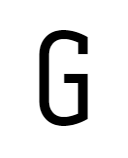
capital-g = 'toothless-corner-inward-serifed-hooked',cv07 = 23Corner toothless G with inward hook at terminal and inward top serif 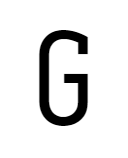
capital-g = 'toothless-rounded-inward-serifed-hooked',cv07 = 24Round toothless G with inward hook at terminal and inward top serif 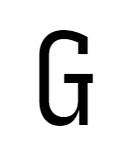
capital-g = 'toothed-inward-serifed-capped',cv07 = 25Toothed G with a cap terminal and inward top serif 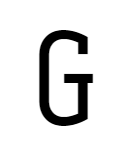
capital-g = 'toothless-corner-inward-serifed-capped',cv07 = 26Corner toothless G with a cap terminal and inward top serif 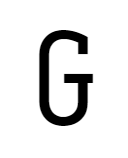
capital-g = 'toothless-rounded-inward-serifed-capped',cv07 = 27Round toothless G with a cap terminal and inward top serif - Styles for
H: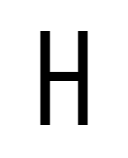
capital-h = 'serifless',cv08 = 1H without serifs 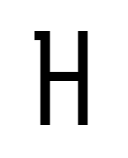
capital-h = 'top-left-serifed',cv08 = 2H with serif only at top left 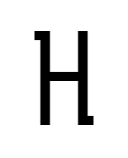
capital-h = 'top-left-bottom-right-serifed',cv08 = 3H with serif only at top left and bottom right 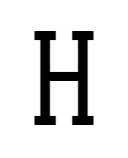
capital-h = 'serifed',cv08 = 4H with serifs - Styles for
I: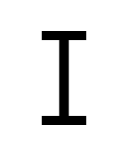
capital-i = 'serifed',cv09 = 1I with standard (long) serifs 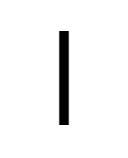
capital-i = 'serifless',cv09 = 2I without serifs, like a straight bar 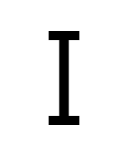
capital-i = 'short-serifed',cv09 = 3I with short serifs - Styles for
J: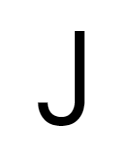
capital-j = 'serifless',cv10 = 1J without top serif 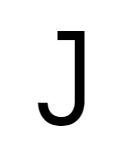
capital-j = 'serifed',cv10 = 2J with top serif at left side 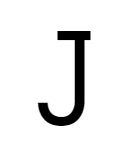
capital-j = 'serifed-both-sides',cv10 = 3J with top serif at both sides (asymmetric) 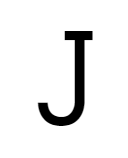
capital-j = 'serifed-symmetric',cv10 = 4J with top serif at both sides (symmetric) 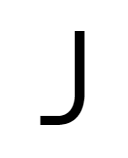
capital-j = 'flat-hook-serifless',cv10 = 5J with flat hook and without top serif 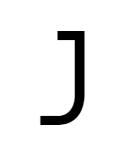
capital-j = 'flat-hook-serifed',cv10 = 6J with flat hook and top serif at left side 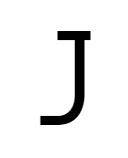
capital-j = 'flat-hook-serifed-both-sides',cv10 = 7J with flat hook and top serif at both sides (asymmetric) 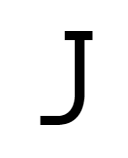
capital-j = 'flat-hook-serifed-symmetric',cv10 = 8J with flat hook and top serif at both sides (symmetric) 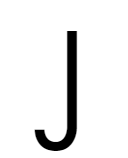
capital-j = 'descending-serifless',cv10 = 9J with hook goes below descender and without serif 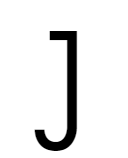
capital-j = 'descending-serifed',cv10 = 10J with hook goes below descender and top serif at left side 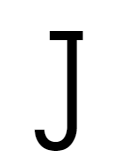
capital-j = 'descending-serifed-both-sides',cv10 = 11J with hook goes below descender and top serif at both sides (asymmetric) 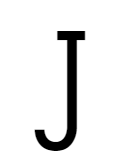
capital-j = 'descending-serifed-symmetric',cv10 = 12J with hook goes below descender and top serif at both sides (symmetric) 
capital-j = 'descending-flat-hook-serifless',cv10 = 13J with flat hook goes below descender and without serif 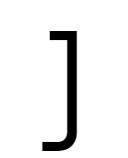
capital-j = 'descending-flat-hook-serifed',cv10 = 14J with flat hook goes below descender and top serif at left side - Styles for
K: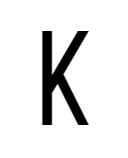
capital-k = 'straight-serifless',cv11 = 1Kwith standard shape, without serifs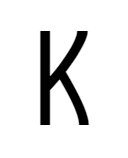
capital-k = 'curly-serifless',cv11 = 2Slightly curly K, like Iosevka 2.x, without serifs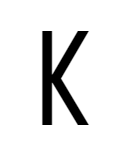
capital-k = 'symmetric-touching-serifless',cv11 = 3Kwith symmetric legs disconnected to the vertical bar, without serifs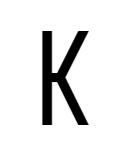
capital-k = 'symmetric-connected-serifless',cv11 = 4Kwith symmetric legs connected to the vertical bar, without serifs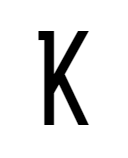
capital-k = 'straight-top-left-serifed',cv11 = 5Kwith standard shape and serifs at top left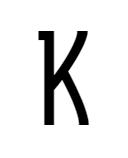
capital-k = 'curly-top-left-serifed',cv11 = 6Slightly curly K, like Iosevka 2.x, with serifs at top left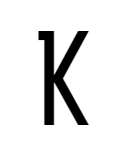
capital-k = 'symmetric-touching-top-left-serifed',cv11 = 7Kwith symmetric legs disconnected to the vertical bar, and serifs at top left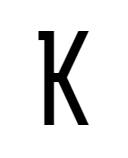
capital-k = 'symmetric-connected-top-left-serifed',cv11 = 8Kwith symmetric legs connected to the vertical bar, and serifs at top left
capital-k = 'straight-bottom-right-serifed',cv11 = 9Kwith standard shape and serifs at bottom right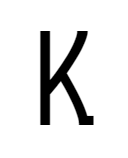
capital-k = 'curly-bottom-right-serifed',cv11 = 10Slightly curly K, like Iosevka 2.x, with serifs at bottom right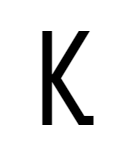
capital-k = 'symmetric-touching-bottom-right-serifed',cv11 = 11Kwith symmetric legs disconnected to the vertical bar, and serifs at bottom right
capital-k = 'symmetric-connected-bottom-right-serifed',cv11 = 12Kwith symmetric legs connected to the vertical bar, and serifs at bottom right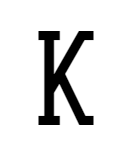
capital-k = 'straight-serifed',cv11 = 13Kwith standard shape, and serifs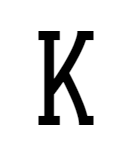
capital-k = 'curly-serifed',cv11 = 14Slightly curly K, like Iosevka 2.x, and with serifs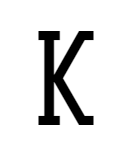
capital-k = 'symmetric-touching-serifed',cv11 = 15Kwith symmetric legs disconnected to the vertical bar, and serifs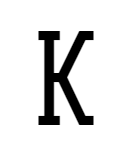
capital-k = 'symmetric-connected-serifed',cv11 = 16Kwith symmetric legs connected to the vertical bar, and serifs - Styles for
L: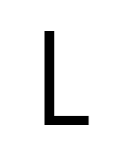
capital-l = 'serifless',cv12 = 1Serifless L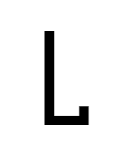
capital-l = 'motion-serifed',cv12 = 2Standard Lwith motion serif at bottom right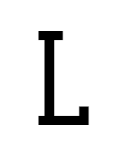
capital-l = 'serifed',cv12 = 3Lwith serifs - Styles for
M: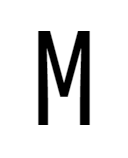
capital-m = 'hanging',cv13 = 1Mwith middle being hanging off baseline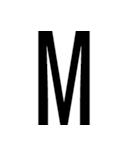
capital-m = 'flat-bottom',cv13 = 2Mwith middle aligned to baseline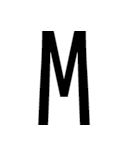
capital-m = 'slanted-sides-hanging',cv13 = 3Mwith slanted sides and middle being hanging off baseline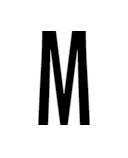
capital-m = 'slanted-sides-flat-bottom',cv13 = 4Mwith slanted sides and middle aligned to baseline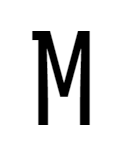
capital-m = 'hanging-motion-serifed',cv13 = 5Mwith middle being hanging off baseline and motion serifs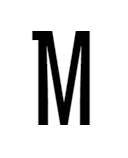
capital-m = 'flat-bottom-motion-serifed',cv13 = 6Mwith middle aligned to baseline and motion serifs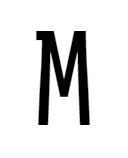
capital-m = 'slanted-sides-hanging-motion-serifed',cv13 = 7Mwith slanted sides, middle being hanging off baseline, and motion serifs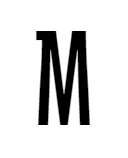
capital-m = 'slanted-sides-flat-bottom-motion-serifed',cv13 = 8Mwith slanted sides, middle aligned to baseline, and motion serifs - Styles for
N: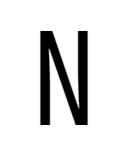
capital-n = 'standard',cv14 = 1Standard N 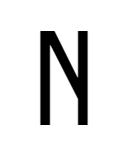
capital-n = 'asymmetric',cv14 = 2More asymmetric N, with the diagonal bar stops at middle of right stem 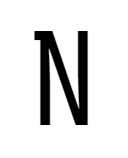
capital-n = 'motion-serifed',cv14 = 3Standard N with motion serifs 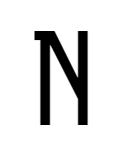
capital-n = 'asymmetric-motion-serifed',cv14 = 4More asymmetric N, with the diagonal bar stops at middle of right stem and motion serifs - Styles for
P: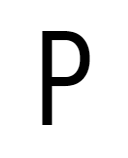
capital-p = 'closed',cv15 = 1Closed P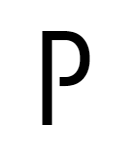
capital-p = 'open',cv15 = 2P with open contour at bottom 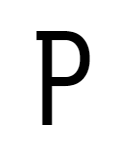
capital-p = 'closed-motion-serifed',cv15 = 3Closed Pwith motion serifs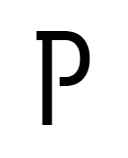
capital-p = 'open-motion-serifed',cv15 = 4P with open contour at bottom and motion serifs - Styles for
Q: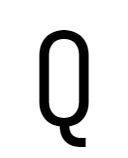
capital-q = 'curly-tailed',cv16 = 1Qwith a curly tail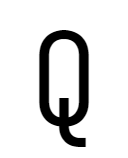
capital-q = 'crossing-curly-tailed',cv16 = 2Qwith a curly tail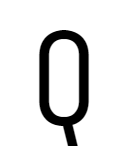
capital-q = 'straight',cv16 = 3Qwith a straight tail like in the old versions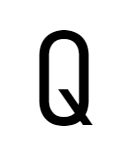
capital-q = 'crossing',cv16 = 4Qwith a tail crossing the ring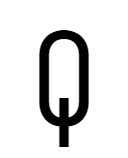
capital-q = 'vertical-crossing',cv16 = 5Qwith a vertical tail crossing the ring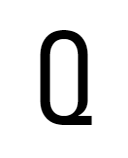
capital-q = 'horizontal-tailed',cv16 = 6Qwith a horizontal tail, like Univers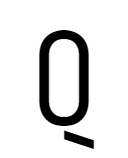
capital-q = 'detached-tailed',cv16 = 7Qwith a oblique tail detached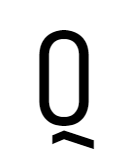
capital-q = 'detached-bend-tailed',cv16 = 8Qwith a bend tail detached - Styles for
R: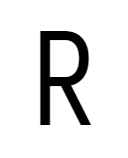
capital-r = 'straight',cv17 = 1Standard, straight-leg R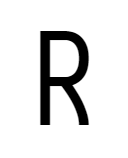
capital-r = 'curly',cv17 = 2Slightly curly-legged R, like Iosevka 2.x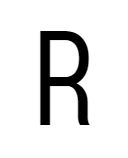
capital-r = 'standing',cv17 = 3Rwith near-vertical standing leg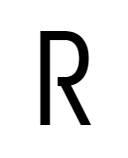
capital-r = 'straight-open',cv17 = 4Standard, straight-leg R, with open contour at bottom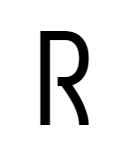
capital-r = 'curly-open',cv17 = 5Slightly curly-legged R, like Iosevka 2.x, with open contour at bottom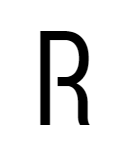
capital-r = 'standing-open',cv17 = 6Rwith near-vertical standing leg, with open contour at bottom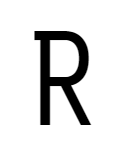
capital-r = 'straight-motion-serifed',cv17 = 7Standard, straight-leg R, with motion serifs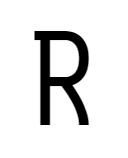
capital-r = 'curly-motion-serifed',cv17 = 8Slightly curly-legged R, like Iosevka 2.x, with motion serifs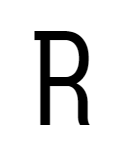
capital-r = 'standing-motion-serifed',cv17 = 9Rwith near-vertical standing leg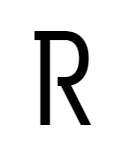
capital-r = 'straight-open-motion-serifed',cv17 = 10Standard, straight-leg R, with open contour at bottom and motion serifs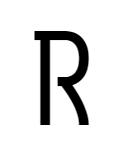
capital-r = 'curly-open-motion-serifed',cv17 = 11Slightly curly-legged R, like Iosevka 2.x, with open contour at bottom and motion serifs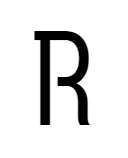
capital-r = 'standing-open-motion-serifed',cv17 = 12Rwith near-vertical standing leg, with open contour at bottom and motion serifs - Styles for
S: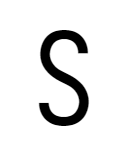
capital-s = 'serifless',cv18 = 1Serifless S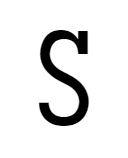
capital-s = 'unilateral-serifed',cv18 = 2Swith single serif at top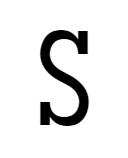
capital-s = 'bilateral-serifed',cv18 = 3Swith serifs at both end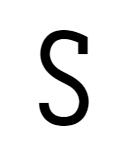
capital-s = 'unilateral-inward-serifed',cv18 = 4Swith single inward serif at top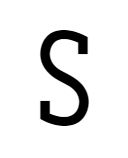
capital-s = 'bilateral-inward-serifed',cv18 = 5Swith inward serifs at both end - Styles for
T: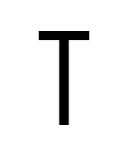
capital-t = 'serifless',cv19 = 1Serifless T 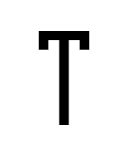
capital-t = 'motion-serifed',cv19 = 2Motion-Serifed T 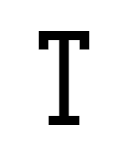
capital-t = 'serifed',cv19 = 3Serifed T - Styles for
U: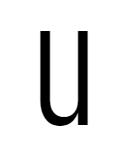
capital-u = 'toothed',cv20 = 1Uwith bottom-right tooth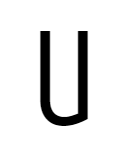
capital-u = 'toothless-corner',cv20 = 2Toothless (corner bottom-right) U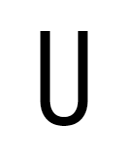
capital-u = 'toothless-rounded',cv20 = 3Toothless (rounded) U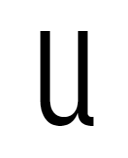
capital-u = 'tailed',cv20 = 4Uwith right bar and a slightly curly tail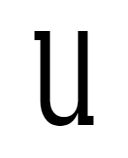
capital-u = 'motion-serifed',cv20 = 5Normal Uwith right bar and motion serifs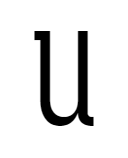
capital-u = 'tailed-motion-serifed',cv20 = 6Uwith right bar, motion serifs and a slightly curly tail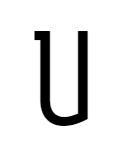
capital-u = 'toothless-corner-unilateral-motion-serifed',cv20 = 7Toothless (corner bottom-right) Uwith motion serifs, like Museo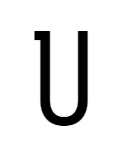
capital-u = 'toothless-rounded-unilateral-motion-serifed',cv20 = 8Toothless (rounded) Uwith motion serifs, like Museo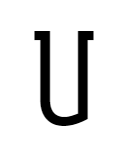
capital-u = 'toothless-corner-bilateral-motion-serifed',cv20 = 9Toothless (corner bottom-right) Uwith motion serifs, like Museo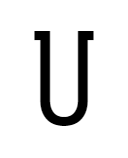
capital-u = 'toothless-rounded-bilateral-motion-serifed',cv20 = 10Toothless (rounded) Uwith motion serifs, like Museo - Styles for
V: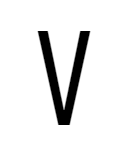
capital-v = 'straight',cv21 = 1Standard, straight V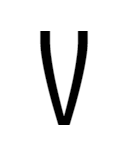
capital-v = 'curly',cv21 = 2Slightly curly V, like Iosevka 2.x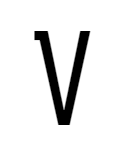
capital-v = 'straight-motion-serifed',cv21 = 3Standard, straight V, and motion serifs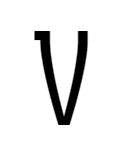
capital-v = 'curly-motion-serifed',cv21 = 4Slightly curly V, like Iosevka 2.x, and motion serifs - Styles for
W: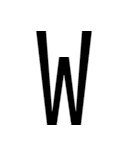
capital-w = 'straight',cv22 = 1Standard, straight W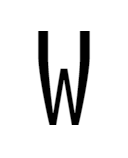
capital-w = 'curly',cv22 = 2Slightly curly W, like Iosevka 2.x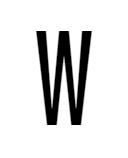
capital-w = 'straight-flat-top',cv22 = 3Standard, straight W, and the middle is forced to be aligned the top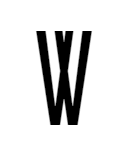
capital-w = 'straight-double-v',cv22 = 4Straight Wlooks like double V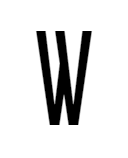
capital-w = 'straight-asymmetric',cv22 = 5Straight Wlooks asymmetric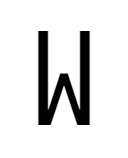
capital-w = 'straight-vertical-sides',cv22 = 6Straight Wwith vertical sides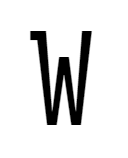
capital-w = 'straight-motion-serifed',cv22 = 7Standard, straight W, with motion serifs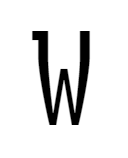
capital-w = 'curly-motion-serifed',cv22 = 8Slightly curly W, like Iosevka 2.x, with motion serifs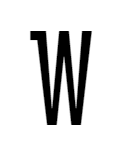
capital-w = 'straight-flat-top-motion-serifed',cv22 = 9Standard, straight W, and the middle is forced to be aligned the top, with motion serifs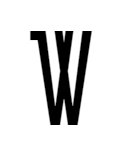
capital-w = 'straight-double-v-motion-serifed',cv22 = 10Straight Wlooks like double V, with motion serifs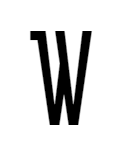
capital-w = 'straight-asymmetric-motion-serifed',cv22 = 11Straight Wlooks asymmetric, with motion serifs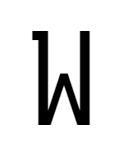
capital-w = 'straight-vertical-sides-motion-serifed',cv22 = 12Straight Wwith vertical sides and motion serifs - Styles for
X: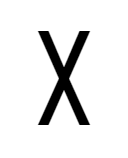
capital-x = 'straight-serifless',cv23 = 1Serifless, straight X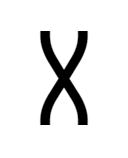
capital-x = 'curly-serifless',cv23 = 2Serifless, slightly curly X, like Iosevka 2.x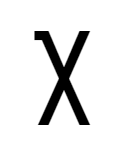
capital-x = 'straight-motion-serifed',cv23 = 3Straight Xwith motion serifs
capital-x = 'curly-motion-serifed',cv23 = 4Slightly curly X, like Iosevka 2.x, with motion serifs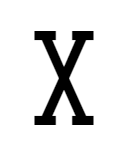
capital-x = 'straight-serifed',cv23 = 5Straight Xwith full serifs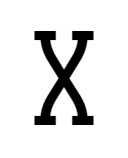
capital-x = 'curly-serifed',cv23 = 6Slightly curly X, like Iosevka 2.x, with full serifs - Styles for
Y: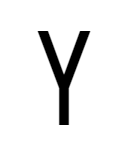
capital-y = 'straight-serifless',cv24 = 1Straight Ywithout serifs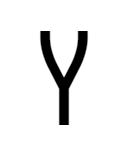
capital-y = 'curly-serifless',cv24 = 2Slightly curly Y, like Iosevka 2.x, without serifs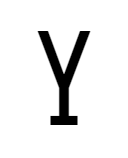
capital-y = 'straight-base-serifed',cv24 = 3Standard, straight Y, with serif at bottom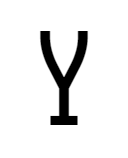
capital-y = 'curly-base-serifed',cv24 = 4Slightly curly Y, like Iosevka 2.x, with serif at bottom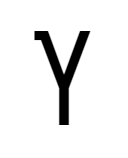
capital-y = 'straight-motion-serifed',cv24 = 5Standard, straight Y, with motion serifs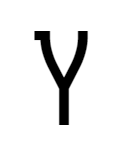
capital-y = 'curly-motion-serifed',cv24 = 6Slightly curly Y, like Iosevka 2.x, with motion serifs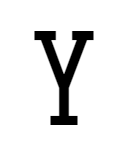
capital-y = 'straight-serifed',cv24 = 7Standard, straight Y, with serifs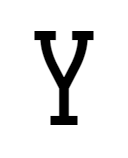
capital-y = 'curly-serifed',cv24 = 8Slightly curly Y, like Iosevka 2.x, with serifs - Styles for
Z:
capital-z = 'straight-serifless',cv25 = 1Straight Zwithout serifs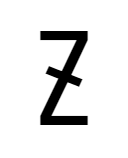
capital-z = 'straight-serifless-with-crossbar',cv25 = 2Straight Zwith a diagonal crossbar, and without serifs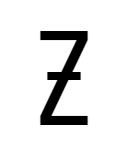
capital-z = 'straight-serifless-with-horizontal-crossbar',cv25 = 3Straight Zwith a horizontal crossbar, and without serifs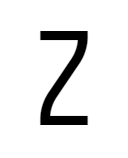
capital-z = 'curly-serifless',cv25 = 4Curly Zwithout serifs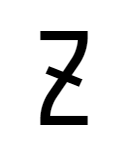
capital-z = 'curly-serifless-with-crossbar',cv25 = 5Curly Zwith a diagonal crossbar, and without serifs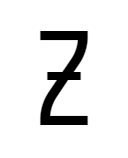
capital-z = 'curly-serifless-with-horizontal-crossbar',cv25 = 6Curly Zwith a horizontal crossbar, and without serifs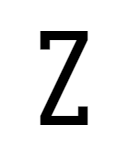
capital-z = 'straight-serifed',cv25 = 7Straight Zwith top and bottom serifs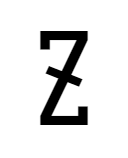
capital-z = 'straight-serifed-with-crossbar',cv25 = 8Straight Zwith a diagonal crossbar and serifs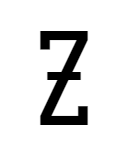
capital-z = 'straight-serifed-with-horizontal-crossbar',cv25 = 9Straight Zwith a horizontal crossbar and serifs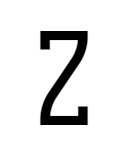
capital-z = 'curly-serifed',cv25 = 10Curly Zwith top and bottom serifs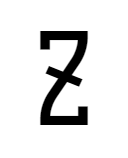
capital-z = 'curly-serifed-with-crossbar',cv25 = 11Curly Zwith a diagonal crossbar and serifs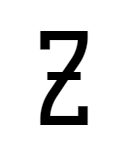
capital-z = 'curly-serifed-with-horizontal-crossbar',cv25 = 12Curly Zwith a horizontal crossbar and serifs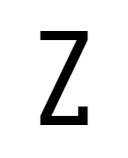
capital-z = 'straight-bottom-serifed',cv25 = 13Standard Zwith serif at bottom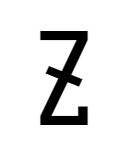
capital-z = 'straight-bottom-serifed-with-crossbar',cv25 = 14Standard Zwith a diagonal crossbar and serif at bottom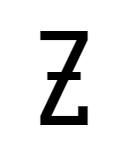
capital-z = 'straight-bottom-serifed-with-horizontal-crossbar',cv25 = 15Standard Zwith a horizontal crossbar and serif at bottom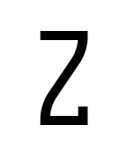
capital-z = 'curly-bottom-serifed-with-crossbar',cv25 = 16Curly Zwith serif at bottom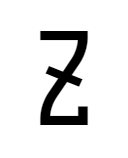
capital-z = 'curly-bottom-serifed-with-horizontal-crossbar',cv25 = 17Curly Zwith a diagonal crossbar and serif at bottom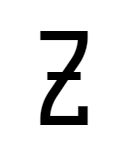
capital-z = 'curly-bottom-serifed',cv25 = 18Curly Zwith a horizontal crossbar and serif at bottom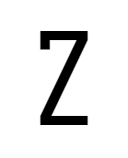
capital-z = 'straight-top-serifed',cv25 = 19Standard Zwith serif at top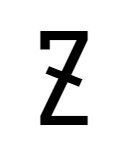
capital-z = 'straight-top-serifed-with-crossbar',cv25 = 20Standard Zwith a diagonal crossbar and serif at top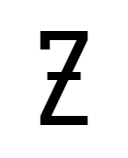
capital-z = 'straight-top-serifed-with-horizontal-crossbar',cv25 = 21Standard Zwith a horizontal crossbar and serif at top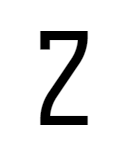
capital-z = 'curly-top-serifed',cv25 = 22Curly Zwith serif at top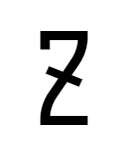
capital-z = 'curly-top-serifed-with-crossbar',cv25 = 23Curly Zwith a diagonal crossbar and serif at top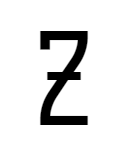
capital-z = 'curly-top-serifed-with-horizontal-crossbar',cv25 = 24Curly Zwith a horizontal crossbar and serif at top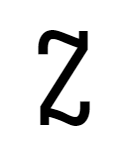
capital-z = 'cursive',cv25 = 25Cursive Z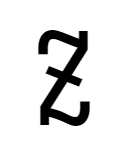
capital-z = 'cursive-with-crossbar',cv25 = 26Cursive Zwith a diagonal cross bar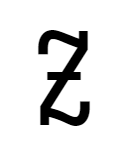
capital-z = 'cursive-with-horizontal-crossbar',cv25 = 27Cursive Zwith a horizontal cross bar - Styles for
a: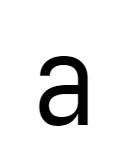
a = 'double-storey-serifless',cv26 = 1Double-storey awithout serifs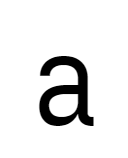
a = 'double-storey-tailed',cv26 = 2Double-storey awith curly tail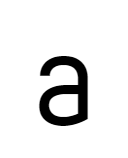
a = 'double-storey-toothless-corner',cv26 = 3Toothless (cornered bottom-right) double-storey a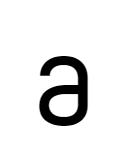
a = 'double-storey-toothless-rounded',cv26 = 4Toothless (rounded bottom-right) double-storey a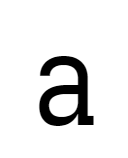
a = 'double-storey-serifed',cv26 = 5Double-storey awith serif at bottom right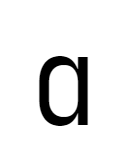
a = 'single-storey-serifless',cv26 = 6Single-storey awithout serifs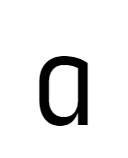
a = 'single-storey-earless-corner-serifless',cv26 = 7Earless (cornered top-right) single-storey awithout serifs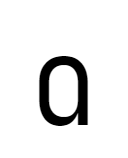
a = 'single-storey-earless-rounded-serifless',cv26 = 8Earless (rounded top-right) single-storey awithout serifs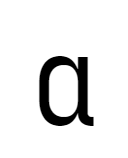
a = 'single-storey-tailed',cv26 = 9Single-storey awith curly tail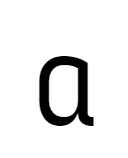
a = 'single-storey-earless-corner-tailed',cv26 = 10Earless (cornered top-right) single-storey awith curly tail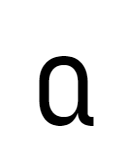
a = 'single-storey-earless-rounded-tailed',cv26 = 11Earless (rounded top-right) single-storey awith curly tail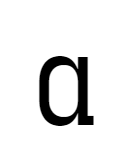
a = 'single-storey-serifed',cv26 = 12Single-storey awith serif at bottom right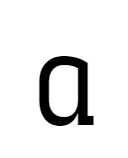
a = 'single-storey-earless-corner-serifed',cv26 = 13Earless (cornered top-right) single-storey awith serif at bottom right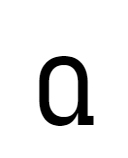
a = 'single-storey-earless-rounded-serifed',cv26 = 14Earless (rounded top-right) single-storey awith serif at bottom right - Styles for
b: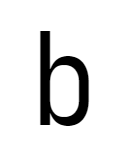
b = 'toothed',cv27 = 1bwith bottom-left tooth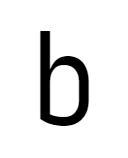
b = 'toothless-corner',cv27 = 2bwithout bottom-left tooth, with a corner transition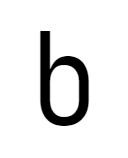
b = 'toothless-rounded',cv27 = 3bwithout bottom-left tooth, with a rounded transition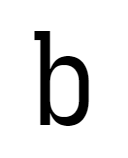
b = 'toothed-motion-serifed',cv27 = 4bwith motion serif, and with bottom-left tooth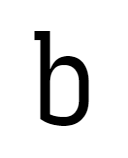
b = 'toothless-corner-motion-serifed',cv27 = 5bwith motion serif, and without bottom-left tooth, with a corner transition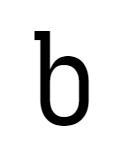
b = 'toothless-rounded-motion-serifed',cv27 = 6bwith motion serif, and without bottom-left tooth, with a rounded transition - Styles for
c: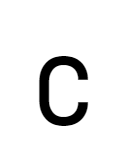
c = 'serifless',cv28 = 1Serifless c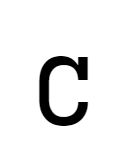
c = 'unilateral-serifed',cv28 = 2cwith serif at top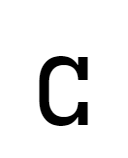
c = 'bilateral-serifed',cv28 = 3cwith serifs at both top and bottom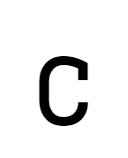
c = 'unilateral-inward-serifed',cv28 = 4cwith inward serif at top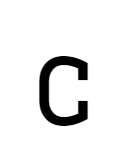
c = 'bilateral-inward-serifed',cv28 = 5cwith inward serif at both top and bottom - Styles for
d: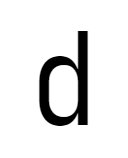
d = 'toothed-serifless',cv29 = 1dwith bottom-right tooth, and without serifs
d = 'toothless-corner-serifless',cv29 = 2dwithout bottom-right tooth, with a corner transition, and without serif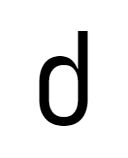
d = 'toothless-rounded-serifless',cv29 = 3dwithout bottom-right tooth, with a rounded transition, and without serif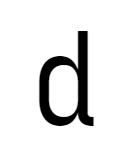
d = 'tailed-serifless',cv29 = 4dwith a bottom-right tail, and without serif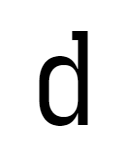
d = 'toothed-top-serifed',cv29 = 5dwith bottom-right tooth and top serif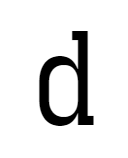
d = 'toothed-serifed',cv29 = 6dwith serifs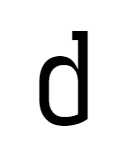
d = 'toothless-corner-serifed',cv29 = 7dwithout bottom-right tooth, with a corner transition and top serif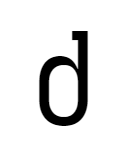
d = 'toothless-rounded-serifed',cv29 = 8dwithout bottom-right tooth, with a rounded transition and top serif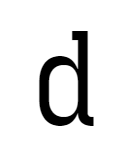
d = 'tailed-serifed',cv29 = 9dwith a bottom-right tail and top serif - Styles for
e: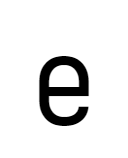
e = 'flat-crossbar',cv30 = 1ewith flat crossbar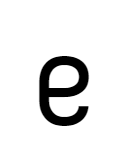
e = 'rounded',cv30 = 2ewith more rounded shape - Styles for
f: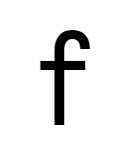
f = 'serifless',cv31 = 1fwithout bottom serif, hook or extension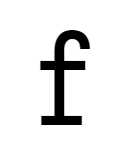
f = 'serifed',cv31 = 2fwith bottom serif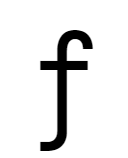
f = 'tailed',cv31 = 3fwith bottom hook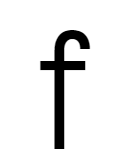
f = 'extended',cv31 = 4fwith bar extended to descender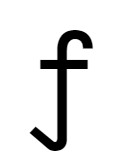
f = 'diagonal-tailed',cv31 = 5fwith bottom diagonal tail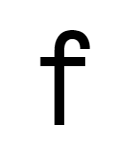
f = 'serifless-crossbar-at-x-height',cv31 = 6fwithout bottom serif, hook or extension; crossbar is placed right at X-height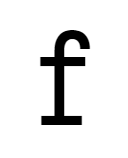
f = 'serifed-crossbar-at-x-height',cv31 = 7fwith bottom serif; crossbar is placed right at X-height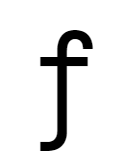
f = 'tailed-crossbar-at-x-height',cv31 = 8fwith bottom hook; crossbar is placed right at X-height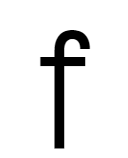
f = 'extended-crossbar-at-x-height',cv31 = 9fwith bar extended to descender; crossbar is placed right at X-height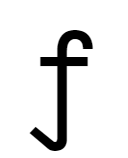
f = 'diagonal-tailed-crossbar-at-x-height',cv31 = 10fwith bottom diagonal tail; crossbar is placed right at X-height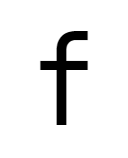
f = 'flat-hook',cv31 = 11fwith flat top hook, without bottom serif, hook or extension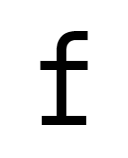
f = 'flat-hook-serifed',cv31 = 12fwith flat top hook and bottom serif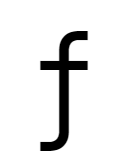
f = 'flat-hook-tailed',cv31 = 13fwith flat top hook and bottom hook
f = 'flat-hook-extended',cv31 = 14fwith flat top hook and bar extended to descender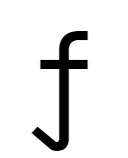
f = 'flat-hook-diagonal-tailed',cv31 = 15fwith flat hook and bottom diagonal tail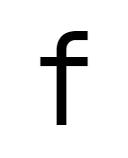
f = 'flat-hook-crossbar-at-x-height',cv31 = 16fwith flat top hook, without bottom serif, hook or extension; crossbar is placed right at X-height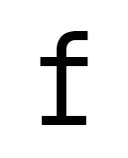
f = 'flat-hook-serifed-crossbar-at-x-height',cv31 = 17fwith flat top hook, bottom serif; crossbar is placed right at X-height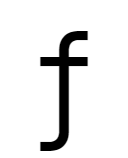
f = 'flat-hook-tailed-crossbar-at-x-height',cv31 = 18fwith flat top hook, bottom hook; crossbar is placed right at X-height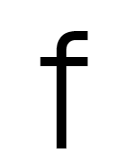
f = 'flat-hook-extended-crossbar-at-x-height',cv31 = 19fwith flat top hook, bar extended to descender; crossbar is placed right at X-height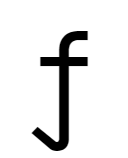
f = 'flat-hook-diagonal-tailed-crossbar-at-x-height',cv31 = 20fwith flat hook and bottom diagonal tail; crossbar is placed right at X-height - Styles for
g: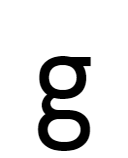
g = 'double-storey',cv32 = 1Double-storey g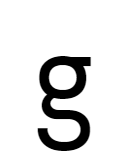
g = 'double-storey-open',cv32 = 2Open Double-storey g, like Trebuchet MS or Fira Code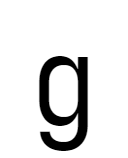
g = 'single-storey-serifless',cv32 = 3Single-storey gwithout serifs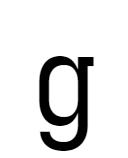
g = 'single-storey-serifed',cv32 = 4Single-storey gwith serif at top right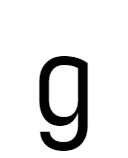
g = 'earless-corner',cv32 = 5Earless (cornered top-right) single-storey g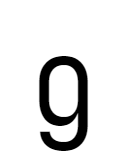
g = 'earless-rounded',cv32 = 6Earless (rounded top-right) single-storey g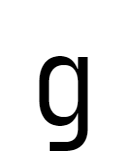
g = 'single-storey-flat-hook-serifless',cv32 = 7Single-storey gwith flat terminal hook and without serifs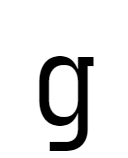
g = 'single-storey-flat-hook-serifed',cv32 = 8Single-storey gwith top-right serif and flat terminal hook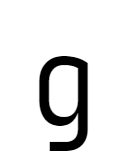
g = 'single-storey-earless-corner-flat-hook',cv32 = 9Earless (cornered top-right) single-storey gwith flat terminal hook
g = 'single-storey-earless-rounded-flat-hook',cv32 = 10Earless (rounded top-right) single-storey gwith flat terminal hook - Styles for
h: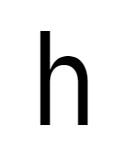
h = 'straight',cv33 = 1hwith straight ending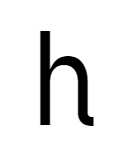
h = 'tailed',cv33 = 2hwith curly tailed ending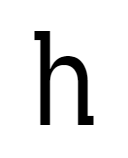
h = 'straight-motion-serifed',cv33 = 3hwith straight ending and motion serifs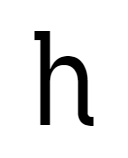
h = 'tailed-motion-serifed',cv33 = 4hwith curly tailed ending and motion serifs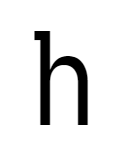
h = 'straight-top-left-serifed',cv33 = 5hwith straight ending and serif at top left - Styles for
i: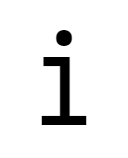
i = 'serifed',cv34 = 1Serifed i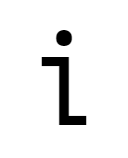
i = 'zshaped',cv34 = 2Z-shaped i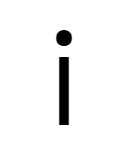
i = 'serifless',cv34 = 3ilike a straight line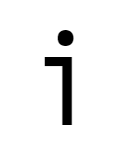
i = 'hooky',cv34 = 4Hooky i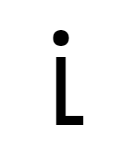
i = 'hooky-bottom',cv34 = 5iwith a sharp-turning horizontal tail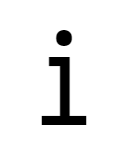
i = 'serifed-asymmetric',cv34 = 6iwith shorter top serif and full bottom serif
i = 'tailed',cv34 = 7iwith curly tail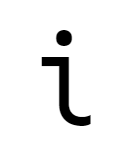
i = 'tailed-serifed',cv34 = 8iwith top serif and curly tail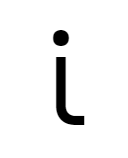
i = 'flat-tailed',cv34 = 9iwith curly-then-flat tail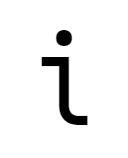
i = 'serifed-flat-tailed',cv34 = 10iwith top serif and curly-then-flat tail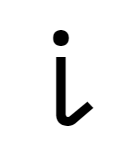
i = 'diagonal-tailed',cv34 = 11iwith diagonal tail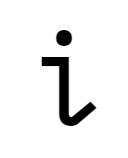
i = 'serifed-diagonal-tailed',cv34 = 12iwith top serif and diagonal tail - Styles for
j: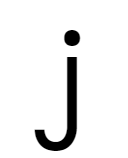
j = 'serifless',cv35 = 1jwithout serif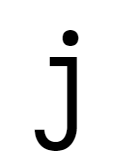
j = 'serifed',cv35 = 2jwith top serif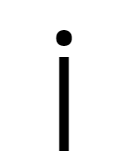
j = 'straight-line',cv35 = 3jlike a straight line
j = 'hooky',cv35 = 4jlike a straight line with top serif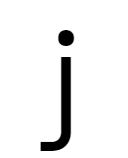
j = 'flat-hook-serifless',cv35 = 5jwith flat terminal hook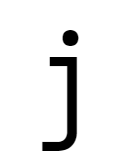
j = 'flat-hook-serifed',cv35 = 6jwith flat terminal hook and top serif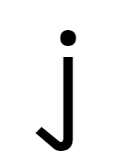
j = 'diagonal-tailed-serifless',cv35 = 7jwith diagonal tail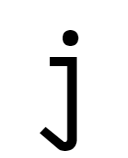
j = 'diagonal-tailed-serifed',cv35 = 8jwith top serif and diagonal tail - Styles for
k: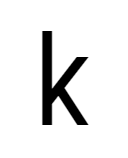
k = 'straight-serifless',cv36 = 1kwith standard shape, and without serifs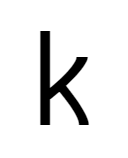
k = 'curly-serifless',cv36 = 2Slightly curly k, like Iosevka 2.x, and without serifs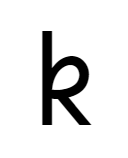
k = 'cursive-serifless',cv36 = 3kwith a cursive loop, and without serifs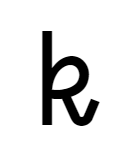
k = 'diagonal-tailed-cursive-serifless',cv36 = 4kwith a cursive loop and diagonal tail, and without serifs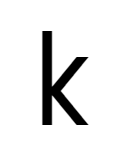
k = 'symmetric-touching-serifless',cv36 = 5kwith symmetric legs disconnected to the vertical bar, and without serifs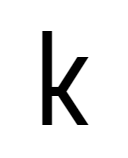
k = 'symmetric-connected-serifless',cv36 = 6kwith symmetric legs connected to the vertical bar, and without serifs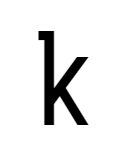
k = 'straight-top-left-serifed',cv36 = 7kwith serifs at top left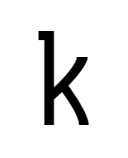
k = 'curly-top-left-serifed',cv36 = 8Slightly curly k, like Iosevka 2.x, with serifs at top left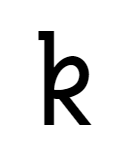
k = 'cursive-top-left-serifed',cv36 = 9kwith a cursive loop and serifs at top left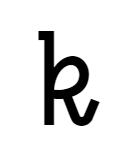
k = 'diagonal-tailed-cursive-top-left-serifed',cv36 = 10kwith a cursive loop, diagonal tail and serifs at top left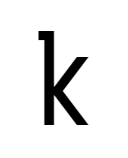
k = 'symmetric-touching-top-left-serifed',cv36 = 11kwith symmetric legs disconnected to the vertical bar and serifs at top left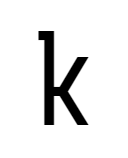
k = 'symmetric-connected-top-left-serifed',cv36 = 12kwith symmetric legs connected to the vertical bar and serifs at top left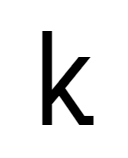
k = 'straight-bottom-right-serifed',cv36 = 13kwith serifs at bottom right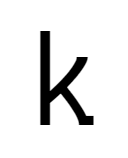
k = 'curly-bottom-right-serifed',cv36 = 14Slightly curly k, like Iosevka 2.x, with serifs at bottom right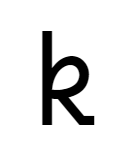
k = 'cursive-bottom-right-serifed',cv36 = 15kwith a cursive loop and serifs at bottom right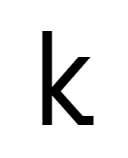
k = 'symmetric-touching-bottom-right-serifed',cv36 = 16kwith symmetric legs disconnected to the vertical bar and serifs at bottom right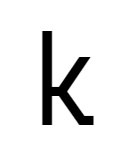
k = 'symmetric-connected-bottom-right-serifed',cv36 = 17kwith symmetric legs connected to the vertical bar and serifs at bottom right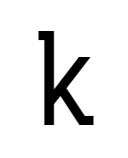
k = 'straight-top-left-and-bottom-right-serifed',cv36 = 18kwith serifs at top left and bottom right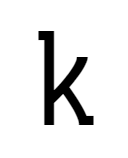
k = 'curly-top-left-and-bottom-right-serifed',cv36 = 19Slightly curly k, like Iosevka 2.x, with serifs at top left and bottom right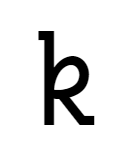
k = 'cursive-top-left-and-bottom-right-serifed',cv36 = 20kwith a cursive loop and serifs at top left and bottom right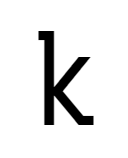
k = 'symmetric-touching-top-left-and-bottom-right-serifed',cv36 = 21kwith symmetric legs disconnected to the vertical bar and serifs at top left and bottom right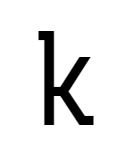
k = 'symmetric-connected-top-left-and-bottom-right-serifed',cv36 = 22kwith symmetric legs connected to the vertical bar and serifs at top left and bottom right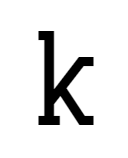
k = 'straight-serifed',cv36 = 23kwith serifs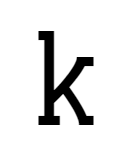
k = 'curly-serifed',cv36 = 24Slightly curly k, like Iosevka 2.x, with serifs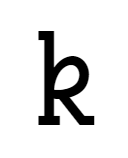
k = 'cursive-serifed',cv36 = 25kwith a cursive loop and serifs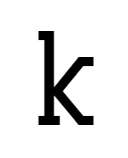
k = 'symmetric-touching-serifed',cv36 = 26kwith symmetric legs disconnected to the vertical bar and serifs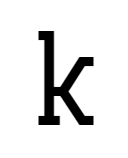
k = 'symmetric-connected-serifed',cv36 = 27kwith symmetric legs connected to the vertical bar and serifs - Styles for
l: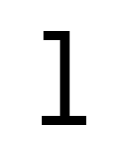
l = 'serifed',cv37 = 1Serifed l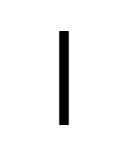
l = 'serifless',cv37 = 2llike a straight line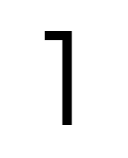
l = 'hooky',cv37 = 3Hooky l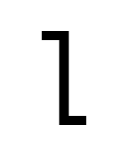
l = 'zshaped',cv37 = 4Z-shaped l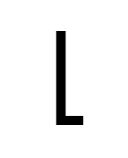
l = 'hooky-bottom',cv37 = 5lwith a straight sharp-turning horizontal tail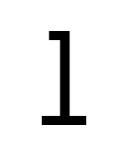
l = 'serifed-asymmetric',cv37 = 6lwith shorter top serif and full bottom serif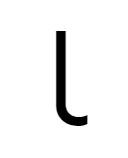
l = 'tailed',cv37 = 7lwith curly tail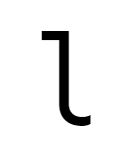
l = 'tailed-serifed',cv37 = 8lwith top serif and curly tail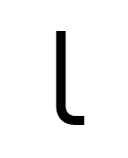
l = 'flat-tailed',cv37 = 9lwith curly-then-flat tail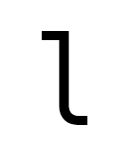
l = 'serifed-flat-tailed',cv37 = 10lwith top serif and curly-then-flat tail
l = 'diagonal-tailed',cv37 = 11lwith diagonal tail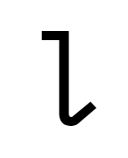
l = 'serifed-diagonal-tailed',cv37 = 12lwith top serif and diagonal tail - Styles for
m: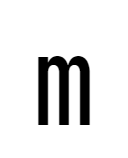
m = 'normal',cv38 = 1mwith normal middle leg, touching the baseline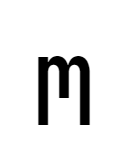
m = 'short-leg',cv38 = 2mwith shorter middle leg, like Ubuntu Mono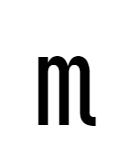
m = 'tailed',cv38 = 3mwith normal middle leg, touching the baseline, and a curly tail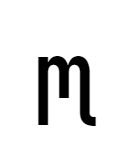
m = 'short-leg-tailed',cv38 = 4mwith shorter middle leg, like Ubuntu Mono, and a curly tail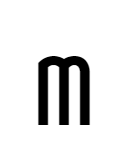
m = 'earless-corner-double-arch',cv38 = 5Earless (corner top-left) mwith normal middle leg touching baseline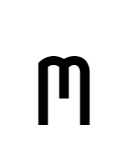
m = 'earless-corner-double-arch-short-leg',cv38 = 6Earless (corner top-left) mwith a shorter middle leg like Ubuntu Mono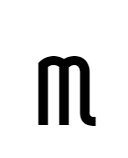
m = 'earless-corner-double-arch-tailed',cv38 = 7Earless (corner top-left) mwith normal middle leg touching baseline, and a curly tail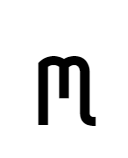
m = 'earless-corner-double-arch-short-leg-tailed',cv38 = 8Earless (corner top-left) mwith a shorter middle leg like Ubuntu Mono, and a curly tail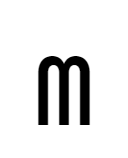
m = 'earless-rounded-double-arch',cv38 = 9Earless (rounded top-left) mwith normal middle leg touching baseline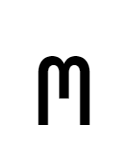
m = 'earless-rounded-double-arch-short-leg',cv38 = 10Earless (rounded top-left) mwith a shorter middle leg like Ubuntu Mono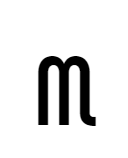
m = 'earless-rounded-double-arch-tailed',cv38 = 11Earless (rounded top-left) mwith normal middle leg touching baseline, and a curly tail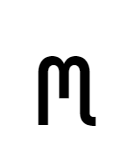
m = 'earless-rounded-double-arch-short-leg-tailed',cv38 = 12Earless (rounded top-left) mwith a shorter middle leg like Ubuntu Mono, and a curly tail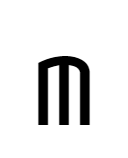
m = 'earless-single-arch',cv38 = 13Earless (single-arch) mwith normal middle leg touching baseline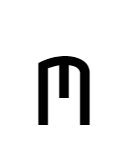
m = 'earless-single-arch-short-leg',cv38 = 14Earless (single-arch) mwith a shorter middle leg like Ubuntu Mono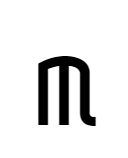
m = 'earless-single-arch-tailed',cv38 = 15Earless (single-arch) mwith normal middle leg touching baseline, and a curly tail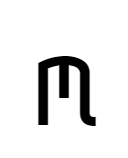
m = 'earless-single-arch-short-leg-tailed',cv38 = 16Earless (single-arch) mwith a shorter middle leg like Ubuntu Mono, and a curly tail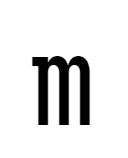
m = 'top-left-serifed',cv38 = 17mwith serif at top left, normal middle leg touching baseline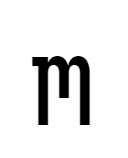
m = 'short-leg-top-left-serifed',cv38 = 18mwith serif at top left, a shorter middle leg like Ubuntu Mono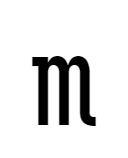
m = 'tailed-top-left-serifed',cv38 = 19mwith serif at top left, normal middle leg touching baseline, and a curly tail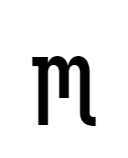
m = 'short-leg-tailed-top-left-serifed',cv38 = 20mwith serif at top left, a shorter middle leg like Ubuntu Mono, and a curly tail
m = 'top-left-and-bottom-right-serifed',cv38 = 21mwith serifs at top left and bottom right, normal middle leg touching baseline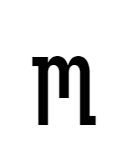
m = 'short-leg-top-left-and-bottom-right-serifed',cv38 = 22mwith serifs at top left and bottom right, a shorter middle leg like Ubuntu Mono - Styles for
n: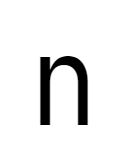
n = 'straight',cv39 = 1nwith straight ending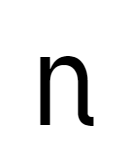
n = 'tailed',cv39 = 2nwith a curly tail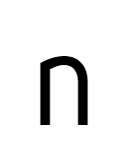
n = 'earless-corner-straight',cv39 = 3Earless (corner top-left) nwith straight ending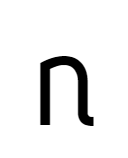
n = 'earless-corner-tailed',cv39 = 4Earless (corner top-left) nwith a curly tail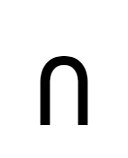
n = 'earless-rounded-straight',cv39 = 5Earless (rounded top-left) nwith straight ending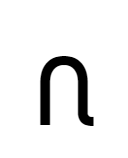
n = 'earless-rounded-tailed',cv39 = 6Earless (rounded top-left) nwith a curly tail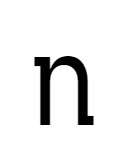
n = 'straight-motion-serifed',cv39 = 7nwith motion serifs and straight ending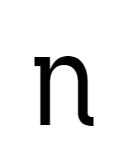
n = 'tailed-motion-serifed',cv39 = 8nwith motion serifs and a curly tail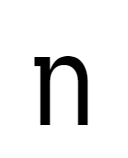
n = 'straight-top-left-serifed',cv39 = 9nwith motion serifs at top left and straight ending - Styles for
p: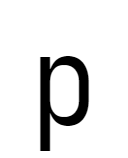
p = 'eared',cv40 = 1pwith top-left ear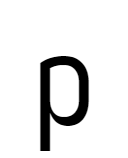
p = 'earless-corner',cv40 = 2pwithout top-left ear (corner)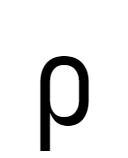
p = 'earless-rounded',cv40 = 3pwithout top-left ear (rounded)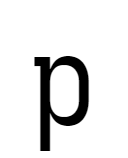
p = 'motion-serifed',cv40 = 4pwith motion serifs - Styles for
q: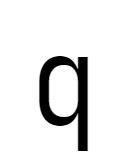
q = 'straight',cv41 = 1qwith straight bar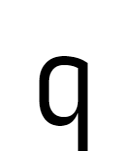
q = 'earless-corner',cv41 = 2Earless (cornered top-left) single-storey q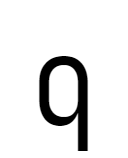
q = 'earless-rounded',cv41 = 3Earless (rounded top-left) single-storey q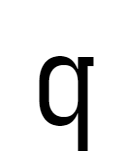
q = 'straight-motion-serifed',cv41 = 4qwith straight bar and motion serifs
q = 'tailed',cv41 = 5qwith tail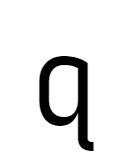
q = 'earless-corner-tailed',cv41 = 6Earless (cornered top-left) single-storey qwith curly tail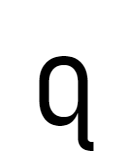
q = 'earless-rounded-tailed',cv41 = 7Earless (rounded top-left) single-storey qwith curly tail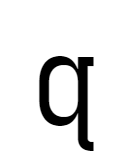
q = 'tailed-motion-serifed',cv41 = 8qwith tail and motion serifs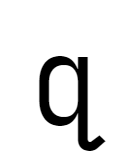
q = 'diagonal-tailed',cv41 = 9qwith diagonal tail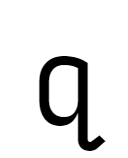
q = 'earless-corner-diagonal-tailed',cv41 = 10Earless (cornered top-left) single-storey qwith curly diagonal tail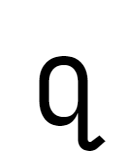
q = 'earless-rounded-diagonal-tailed',cv41 = 11Earless (rounded top-left) single-storey qwith curly diagonal tail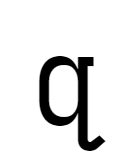
q = 'diagonal-tailed-motion-serifed',cv41 = 12qwith diagonal tail and motion serifs - Styles for
r: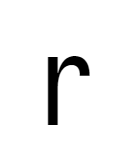
r = 'serifless',cv42 = 1Straight, serif-less r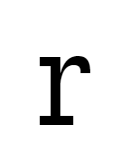
r = 'serifed',cv42 = 2rwith serif at both top and bottom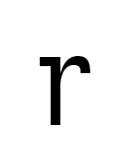
r = 'top-serifed',cv42 = 3rwith serifs at top-left only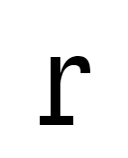
r = 'base-serifed',cv42 = 4rwith serifs at top-left only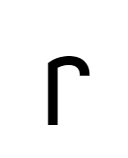
r = 'earless-corner',cv42 = 5Earless (corner top-left), serif-less r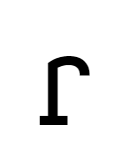
r = 'earless-corner-serifed',cv42 = 6Earless (corner top-left), serifed r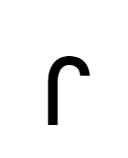
r = 'earless-rounded',cv42 = 7Earless (rounded top-left), serif-less r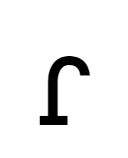
r = 'earless-rounded-serifed',cv42 = 8Earless (rounded top-left), serifed r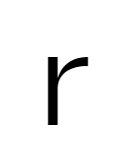
r = 'compact',cv42 = 9Compact, serifless r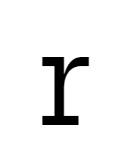
r = 'compact-serifed',cv42 = 10Compact rwith top and bottom serifs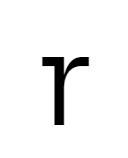
r = 'compact-top-serifed',cv42 = 11Compact rwith top serif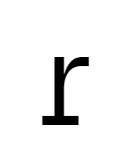
r = 'compact-base-serifed',cv42 = 12Compact rwith bottom serif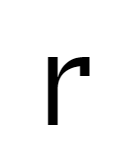
r = 'corner-hooked',cv42 = 13rwith vertical corner hook downwards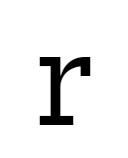
r = 'corner-hooked-serifed',cv42 = 14rwith vertical corner hook downwards, top and bottom serifs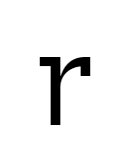
r = 'corner-hooked-top-serifed',cv42 = 15rwith vertical corner hook downwards and top serif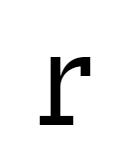
r = 'corner-hooked-base-serifed',cv42 = 16rwith vertical corner hook downwards and bottom serif - Styles for
s: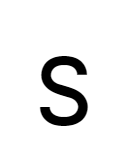
s = 'serifless',cv43 = 1Serifless s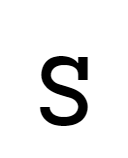
s = 'unilateral-serifed',cv43 = 2swith single serif at top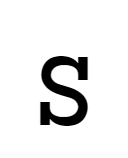
s = 'bilateral-serifed',cv43 = 3swith serifs at both end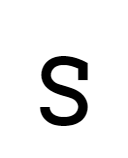
s = 'unilateral-inward-serifed',cv43 = 4swith single inward serif at top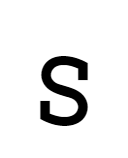
s = 'bilateral-inward-serifed',cv43 = 5swith inward serifs at both end - Styles for
t: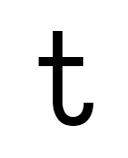
t = 'standard',cv44 = 1Standard tshape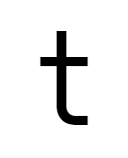
t = 'flat-hook',cv44 = 2twith flat hook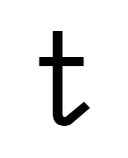
t = 'diagonal-tailed',cv44 = 3twith diagonal tail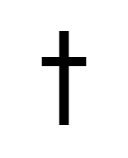
t = 'cross',cv44 = 4Futura-like tshape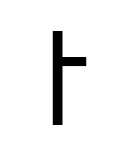
t = 'hookless-asymmetric',cv44 = 5twithout hook and with ony half the cross bar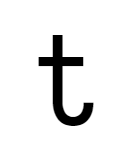
t = 'standard-short-neck',cv44 = 6Standard tshape with a shorter neck
t = 'flat-hook-short-neck',cv44 = 7twith flat hook and a slightly shorter neck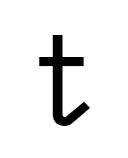
t = 'diagonal-tailed-short-neck',cv44 = 8twith diagonal tail and a shorter neck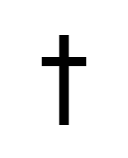
t = 'cross-short-neck',cv44 = 9Futura-like tshape with a shorter neck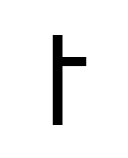
t = 'hookless-asymmetric-short-neck',cv44 = 10twithout hook, with ony half the cross bar and a shorter neck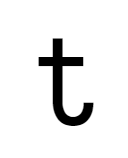
t = 'standard-short-neck2',cv44 = 11Standard tshape with a more shorter neck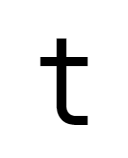
t = 'flat-hook-short-neck2',cv44 = 12twith flat hook and a more shorter neck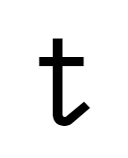
t = 'diagonal-tailed-short-neck2',cv44 = 13twith diagonal tail and a more shorter neck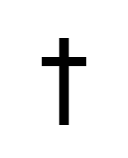
t = 'cross-short-neck2',cv44 = 14Futura-like tshape with a more shorter neck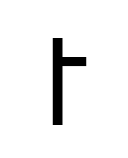
t = 'hookless-asymmetric-short-neck2',cv44 = 15twithout hook, with ony half the cross bar and a more shorter neck - Styles for
u: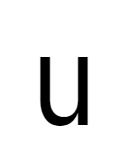
u = 'toothed',cv45 = 1Normal uwith bottom-right tooth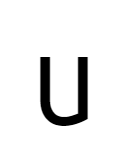
u = 'toothless-corner',cv45 = 2Toothless (corner bottom-right) u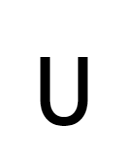
u = 'toothless-rounded',cv45 = 3Toothless (rounded) u, like a smaller uppercaseU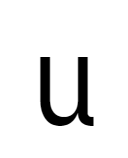
u = 'tailed',cv45 = 4uwith right bar and a slightly curly tail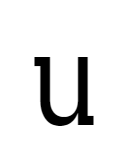
u = 'motion-serifed',cv45 = 5Normal uwith right bar and motion serifs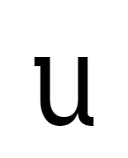
u = 'tailed-motion-serifed',cv45 = 6uwith right bar, motion serifs and a slightly curly tail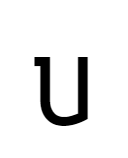
u = 'toothless-corner-motion-serifed',cv45 = 7Toothless (corner bottom-right) uwith motion serifs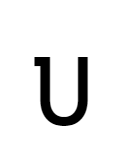
u = 'toothless-rounded-motion-serifed',cv45 = 8Toothless (rounded) uwith motion serifs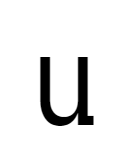
u = 'bottom-right-serifed',cv45 = 9uwith right bar and a slightly curly tail - Styles for
v: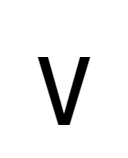
v = 'straight',cv46 = 1Standard, straight v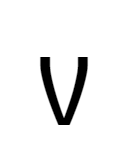
v = 'curly',cv46 = 2Slightly curly v, like Iosevka 2.x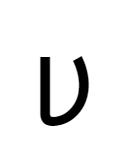
v = 'cursive',cv46 = 3Cursive v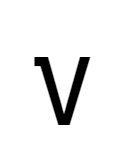
v = 'straight-motion-serifed',cv46 = 4Standard, straight v, with motion serifs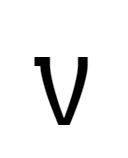
v = 'curly-motion-serifed',cv46 = 5Slightly curly v, like Iosevka 2.x, with motion serifs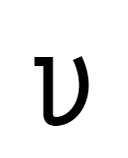
v = 'cursive-serifed',cv46 = 6Cursive vwith motion serifs - Styles for
w: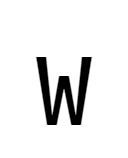
w = 'straight',cv47 = 1Standard, straight w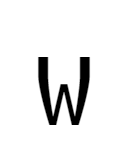
w = 'curly',cv47 = 2Slightly curly w, like Iosevka 2.x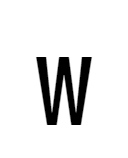
w = 'straight-flat-top',cv47 = 3Standard, straight w, and the middle is forced to be aligned the top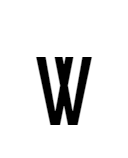
w = 'straight-double-v',cv47 = 4Straight wlooks like double V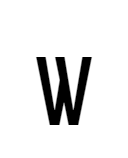
w = 'straight-asymmetric',cv47 = 5Straight wlooks asymmetric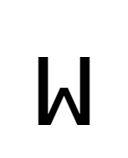
w = 'straight-vertical-sides',cv47 = 6Straight wwith vertical sides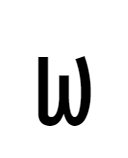
w = 'cursive',cv47 = 7Cursive w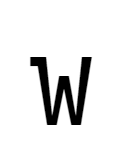
w = 'straight-motion-serifed',cv47 = 8Standard, straight w, with motion serifs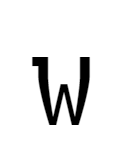
w = 'curly-motion-serifed',cv47 = 9Slightly curly w, like Iosevka 2.x, with motion serifs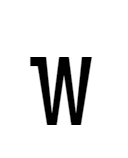
w = 'straight-flat-top-motion-serifed',cv47 = 10Standard, straight w, and the middle is forced to be aligned the top, with motion serifs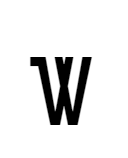
w = 'straight-double-v-motion-serifed',cv47 = 11Straight wlooks like double V, with motion serifs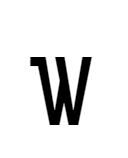
w = 'straight-asymmetric-motion-serifed',cv47 = 12Straight wlooks asymmetric, with motion serifs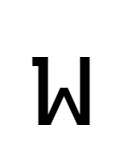
w = 'straight-vertical-sides-motion-serifed',cv47 = 13Straight wwith vertical sides and motion serifs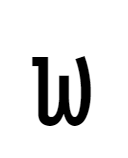
w = 'cursive-motion-serifed',cv47 = 14Cursive wwith motion serifs - Styles for
x: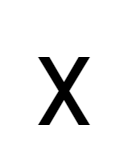
x = 'straight-serifless',cv48 = 1Serifless, straight x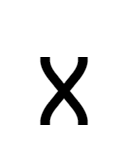
x = 'curly-serifless',cv48 = 2Serifless, slightly curly x, like Iosevka 2.x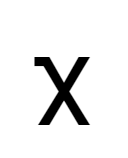
x = 'straight-motion-serifed',cv48 = 3Straight xwith motion serifs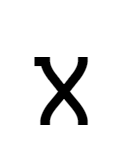
x = 'curly-motion-serifed',cv48 = 4Slightly curly x, like Iosevka 2.x, with motion serifs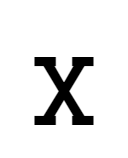
x = 'straight-serifed',cv48 = 5Straight xwith full serifs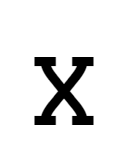
x = 'curly-serifed',cv48 = 6Slightly curly x, like Iosevka 2.x, with full serifs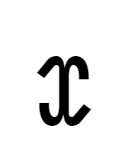
x = 'cursive',cv48 = 7Cursive x - Styles for
y:
y = 'straight',cv49 = 1Letter ythat is fully straight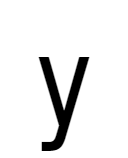
y = 'straight-turn',cv49 = 2Letter ywith straight upper and a tail turns leftward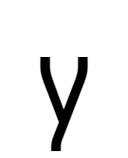
y = 'curly',cv49 = 3More curly letter y, like Iosevka 2.x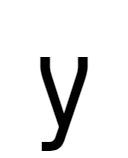
y = 'curly-turn',cv49 = 4More curly letter y, like Iosevka 2.x, with a tail turns leftward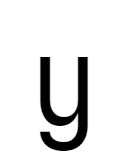
y = 'cursive',cv49 = 5Cursive-like y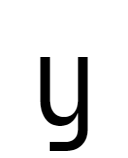
y = 'cursive-flat-hook',cv49 = 6Cursive-like ywith flat terminal hook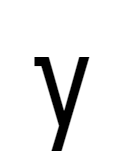
y = 'straight-motion-serifed',cv49 = 7Letter ythat is fully straight, with motion serifs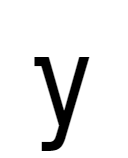
y = 'straight-turn-motion-serifed',cv49 = 8Letter ywith straight upper and a tail turns leftward, and motion serifs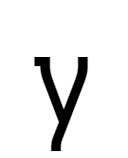
y = 'curly-motion-serifed',cv49 = 9More curly letter y, like Iosevka 2.x, with motion serifs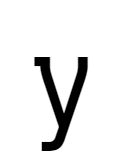
y = 'curly-turn-motion-serifed',cv49 = 10More curly letter y, like Iosevka 2.x, with a tail turns leftward and motion serifs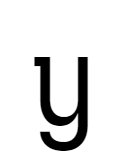
y = 'cursive-motion-serifed',cv49 = 11Cursive-like y, with motion serifs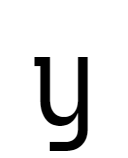
y = 'cursive-flat-hook-motion-serifed',cv49 = 12Cursive-like ywith flat terminal hook, and motion serifs - Styles for
z: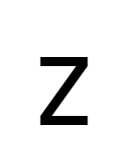
z = 'straight-serifless',cv50 = 1Straight zwithout serifs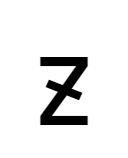
z = 'straight-serifless-with-crossbar',cv50 = 2Straight zwith a diagonal crossbar, and without serifs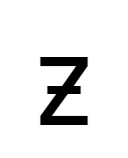
z = 'straight-serifless-with-horizontal-crossbar',cv50 = 3Straight zwith a horizontal crossbar, and without serifs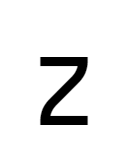
z = 'curly-serifless',cv50 = 4Curly zwithout serifs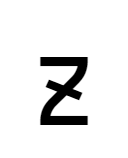
z = 'curly-serifless-with-crossbar',cv50 = 5Curly zwith a diagonal crossbar, and without serifs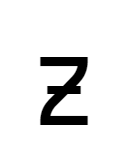
z = 'curly-serifless-with-horizontal-crossbar',cv50 = 6Curly zwith a horizontal crossbar, and without serifs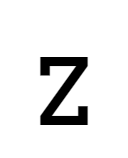
z = 'straight-serifed',cv50 = 7Straight zwith top and bottom serifs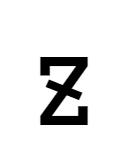
z = 'straight-serifed-with-crossbar',cv50 = 8Straight zwith a diagonal crossbar and serifs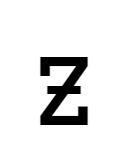
z = 'straight-serifed-with-horizontal-crossbar',cv50 = 9Straight zwith a horizontal crossbar and serifs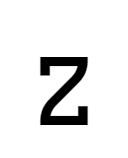
z = 'curly-serifed',cv50 = 10Curly zwith top and bottom serifs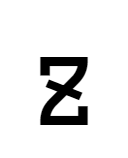
z = 'curly-serifed-with-crossbar',cv50 = 11Curly zwith a diagonal crossbar and serifs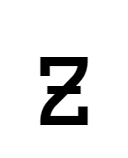
z = 'curly-serifed-with-horizontal-crossbar',cv50 = 12Curly zwith a horizontal crossbar and serifs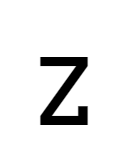
z = 'straight-bottom-serifed',cv50 = 13Standard zwith serif at bottom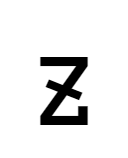
z = 'straight-bottom-serifed-with-crossbar',cv50 = 14Standard zwith a diagonal crossbar and serif at bottom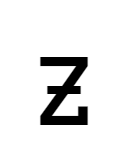
z = 'straight-bottom-serifed-with-horizontal-crossbar',cv50 = 15Standard zwith a horizontal crossbar and serif at bottom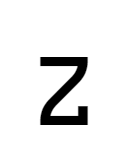
z = 'curly-bottom-serifed-with-crossbar',cv50 = 16Curly zwith serif at bottom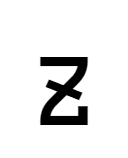
z = 'curly-bottom-serifed-with-horizontal-crossbar',cv50 = 17Curly zwith a diagonal crossbar and serif at bottom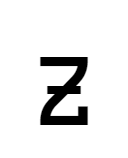
z = 'curly-bottom-serifed',cv50 = 18Curly zwith a horizontal crossbar and serif at bottom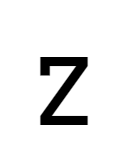
z = 'straight-top-serifed',cv50 = 19Standard zwith serif at top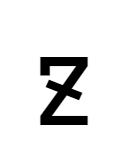
z = 'straight-top-serifed-with-crossbar',cv50 = 20Standard zwith a diagonal crossbar and serif at top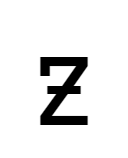
z = 'straight-top-serifed-with-horizontal-crossbar',cv50 = 21Standard zwith a horizontal crossbar and serif at top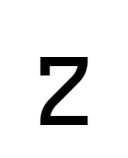
z = 'curly-top-serifed',cv50 = 22Curly zwith serif at top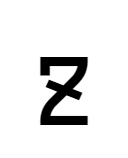
z = 'curly-top-serifed-with-crossbar',cv50 = 23Curly zwith a diagonal crossbar and serif at top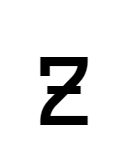
z = 'curly-top-serifed-with-horizontal-crossbar',cv50 = 24Curly zwith a horizontal crossbar and serif at top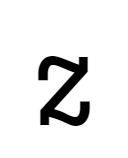
z = 'cursive',cv50 = 25Cursive z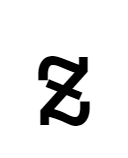
z = 'cursive-with-crossbar',cv50 = 26Cursive zwith a diagonal cross bar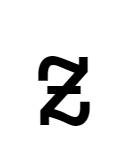
z = 'cursive-with-horizontal-crossbar',cv50 = 27Cursive zwith a horizontal cross bar - Styles for
ſ(Long-S):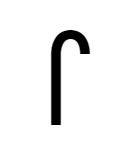
long-s = 'bent-hook',cv51 = 1Long-S with standard bending hook 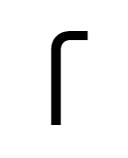
long-s = 'flat-hook',cv51 = 2Long-S with flat hook 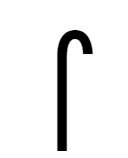
long-s = 'bent-hook-descending',cv51 = 3Long-S with standard bending hook and descends baseline 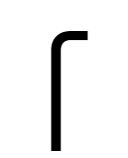
long-s = 'flat-hook-descending',cv51 = 4Long-S with flat hook and descends baseline 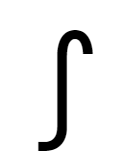
long-s = 'bent-hook-tailed',cv51 = 5Long-S with standard bending hook and tail 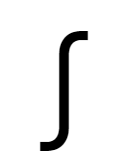
long-s = 'flat-hook-tailed',cv51 = 6Long-S with flat hook and tail - Styles for
ß(Eszet):
eszet = 'traditional',cv52 = 1Traditional, Fraktur-like Eszet ( ß)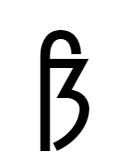
eszet = 'traditional-descending',cv52 = 2Traditional, Fraktur-like Eszet ( ß) with descending bar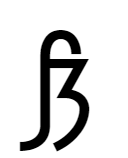
eszet = 'traditional-tailed',cv52 = 3Traditional, Fraktur-like Eszet ( ß) with descending tail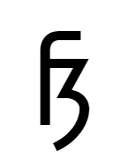
eszet = 'traditional-flat-hook',cv52 = 4Traditional, Fraktur-like Eszet ( ß) with flat hook
eszet = 'traditional-flat-hook-descending',cv52 = 5Traditional, Fraktur-like Eszet ( ß) with flat hook and descending bar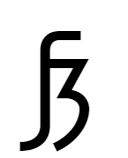
eszet = 'traditional-flat-hook-tailed',cv52 = 6Traditional, Fraktur-like Eszet ( ß) with flat hook and descending tail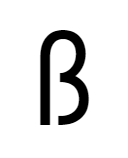
eszet = 'sulzbacher',cv52 = 7More modern, beta-like Eszet ( ß)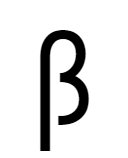
eszet = 'sulzbacher-descending',cv52 = 8More modern, beta-like Eszet ( ß) with descending bar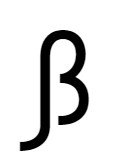
eszet = 'sulzbacher-tailed',cv52 = 9More modern, beta-like Eszet ( ß) with descending tail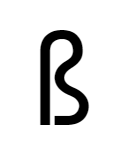
eszet = 'longs-s-lig',cv52 = 10Eszet ( ß) shown as a ligature of long-S (ſ) ands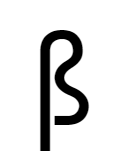
eszet = 'longs-s-lig-descending',cv52 = 11Eszet ( ß) shown as a ligature of long-S (ſ) ands, with descending bar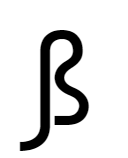
eszet = 'longs-s-lig-tailed',cv52 = 12Eszet ( ß) shown as a ligature of long-S (ſ) ands, with descending tail - Styles for
Λ,Δ(Greek capital Lambda (Λ) and Greek capital Delta (Δ)):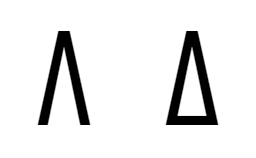
turn-v = 'straight',cv53 = 1Standard, straight Greek capital Lambda ( Λ) and Greek capital Delta (Δ)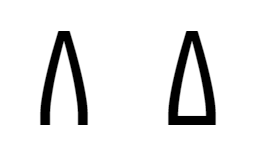
turn-v = 'curly',cv53 = 2Slightly curly Greek capital Lambda ( Λ) and Greek capital Delta (Δ), like Iosevka 2.x - Styles for
α(Greek lower Alpha):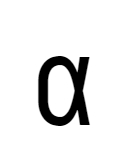
lower-alpha = 'crossing',cv54 = 1Greek lower Alpha ( α) with a cross-like shape at right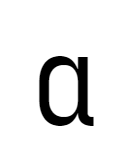
lower-alpha = 'tailed-barred',cv54 = 2Greek lower Alpha ( α) with a straight right bar and tail - Styles for
δ(Greek lower Delta):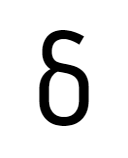
lower-delta = 'rounded',VXAA = 1Greek lower Delta ( δ) with rounded top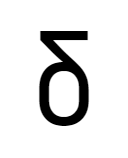
lower-delta = 'flat-top',VXAA = 2Greek lower Delta ( δ) with flat top - Styles for
Γ(Greek capital Gamma):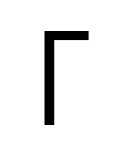
capital-gamma = 'serifless',cv55 = 1Standard capital Gamma ( Γ) without serifs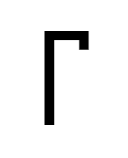
capital-gamma = 'top-right-serifed',cv55 = 2Standard capital Gamma ( Γ) with serifs at top right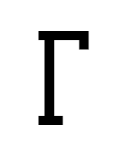
capital-gamma = 'serifed',cv55 = 3Standard capital Gamma ( Γ) with motion serifs at top and bottom - Styles for
ι(Greek lower Iota):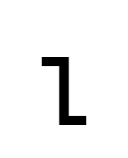
lower-iota = 'zshaped',cv56 = 1Z-shaped Greek lower Iota ( ι)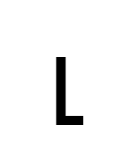
lower-iota = 'hooky-bottom',cv56 = 2Greek lower Iota ( ι) with a sharp-turning horizontal tail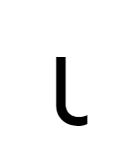
lower-iota = 'tailed',cv56 = 3Greek lower Iota ( ι) with curly tail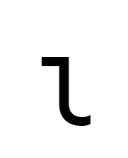
lower-iota = 'tailed-serifed',cv56 = 4Greek lower Iota ( ι) with top serif and curly tail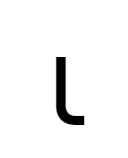
lower-iota = 'flat-tailed',cv56 = 5Greek lower Iota ( ι) with a curly-then-flat tail
lower-iota = 'serifed-flat-tailed',cv56 = 6Greek lower Iota ( ι) with top serif and a curly-then-flat tail - Styles for
λ(Greek small Lambda):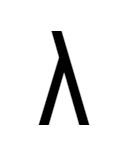
lower-lambda = 'straight',cv57 = 1More-straight Greek small Lambda ( λ)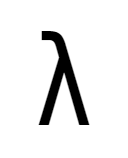
lower-lambda = 'straight-turn',cv57 = 2Greek small Lambda ( λ) with straight upper and a tail turns leftward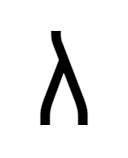
lower-lambda = 'curly',cv57 = 3More curly Greek small Lambda ( λ), like Iosevka 2.x
lower-lambda = 'curly-turn',cv57 = 4More curly Greek small Lambda ( λ), like Iosevka 2.x, with a tail turns leftward - Styles for
μ(Greek small Mu):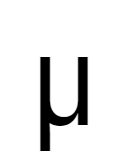
lower-mu = 'tailless',VXAC = 1Tailless Greek small Mu ( μ)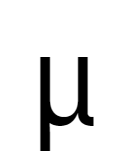
lower-mu = 'tailed',VXAC = 2Tailed Greek small Mu ( μ) - Styles for
ξ(Greek lower Xi):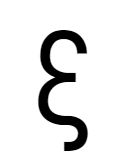
lower-xi = 'rounded',VXAB = 1Greek lower Xi ( ξ) with rounded top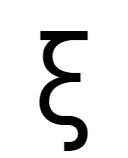
lower-xi = 'flat-top',VXAB = 2Greek lower Xi ( ξ) with flat top - Styles for
З(Cyrillic Capital Ze):
cyrl-capital-ze = 'serifless',cv58 = 1Serifless Cyrillic Capital Ze ( З)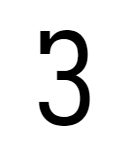
cyrl-capital-ze = 'unilateral-serifed',cv58 = 2Cyrillic Capital Ze ( З) with serif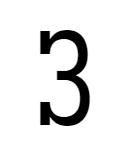
cyrl-capital-ze = 'bilateral-serifed',cv58 = 3Cyrillic Capital Ze ( З) with serif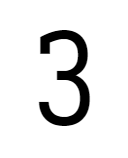
cyrl-capital-ze = 'unilateral-inward-serifed',cv58 = 4Cyrillic Capital Ze ( З) with inward serif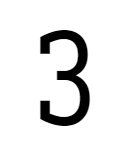
cyrl-capital-ze = 'bilateral-inward-serifed',cv58 = 5Cyrillic Capital Ze ( З) with inward serif - Styles for
з(Cyrillic Lower Ze):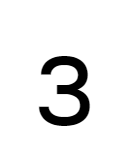
cyrl-ze = 'serifless',cv59 = 1Serifless Cyrillic Lower Ze ( з)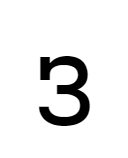
cyrl-ze = 'unilateral-serifed',cv59 = 2Cyrillic Lower Ze ( з) with serif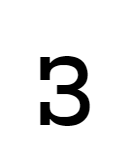
cyrl-ze = 'bilateral-serifed',cv59 = 3Cyrillic Lower Ze ( з) with serif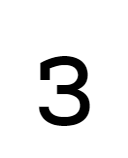
cyrl-ze = 'unilateral-inward-serifed',cv59 = 4Cyrillic Lower Ze ( з) with inward serif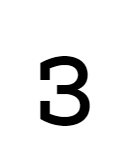
cyrl-ze = 'bilateral-inward-serifed',cv59 = 5Cyrillic Lower Ze ( з) with inward serif - Styles for
К(Cyrillic Capital Ka):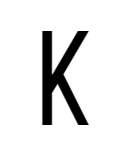
cyrl-capital-ka = 'straight-serifless',cv60 = 1Cyrillic Capital Ka ( К) with standard shape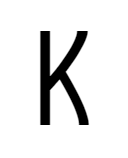
cyrl-capital-ka = 'curly-serifless',cv60 = 2Slightly curly Cyrillic Capital Ka ( К) , like Iosevka 2.x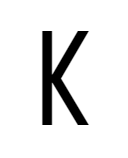
cyrl-capital-ka = 'symmetric-touching-serifless',cv60 = 3Cyrillic Capital Ka ( К) with symmetric legs disconnected to the vertical bar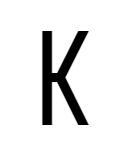
cyrl-capital-ka = 'symmetric-connected-serifless',cv60 = 4Cyrillic Capital Ka ( К) with symmetric legs connected to the vertical bar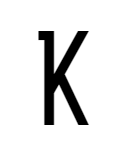
cyrl-capital-ka = 'straight-top-left-serifed',cv60 = 5Cyrillic Capital Ka ( К) with standard shape and serifs at top left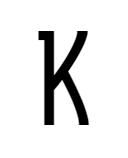
cyrl-capital-ka = 'curly-top-left-serifed',cv60 = 6Slightly curly Cyrillic Capital Ka ( К) , like Iosevka 2.x, with serifs at top left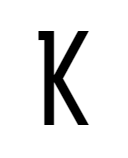
cyrl-capital-ka = 'symmetric-touching-top-left-serifed',cv60 = 7Cyrillic Capital Ka ( К) with symmetric legs disconnected to the vertical bar, and serifs at top left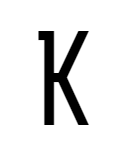
cyrl-capital-ka = 'symmetric-connected-top-left-serifed',cv60 = 8Cyrillic Capital Ka ( К) with symmetric legs connected to the vertical bar, and serifs at top left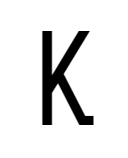
cyrl-capital-ka = 'straight-bottom-right-serifed',cv60 = 9Cyrillic Capital Ka ( К) with standard shape and serifs at bottom right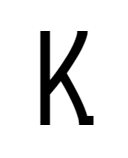
cyrl-capital-ka = 'curly-bottom-right-serifed',cv60 = 10Slightly curly Cyrillic Capital Ka ( К) , like Iosevka 2.x, with serifs at bottom right
cyrl-capital-ka = 'symmetric-touching-bottom-right-serifed',cv60 = 11Cyrillic Capital Ka ( К) with symmetric legs disconnected to the vertical bar, and serifs at bottom right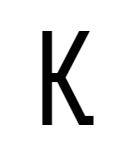
cyrl-capital-ka = 'symmetric-connected-bottom-right-serifed',cv60 = 12Cyrillic Capital Ka ( К) with symmetric legs connected to the vertical bar, and serifs at bottom right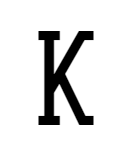
cyrl-capital-ka = 'straight-serifed',cv60 = 13Cyrillic Capital Ka ( К) with standard shape and serifs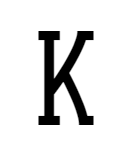
cyrl-capital-ka = 'curly-serifed',cv60 = 14Slightly curly Cyrillic Capital Ka ( К) , like Iosevka 2.x, with serifs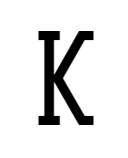
cyrl-capital-ka = 'symmetric-touching-serifed',cv60 = 15Cyrillic Capital Ka ( К) with symmetric legs disconnected to the vertical bar, and serifs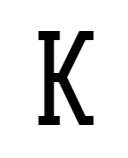
cyrl-capital-ka = 'symmetric-connected-serifed',cv60 = 16Cyrillic Capital Ka ( К) with symmetric legs connected to the vertical bar, and serifs - Styles for
к(Cyrillic Ka):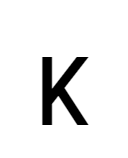
cyrl-ka = 'straight-serifless',cv61 = 1Cyrillic Lower Ka ( к) with standard shape, and without serifs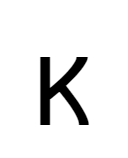
cyrl-ka = 'curly-serifless',cv61 = 2Slightly curly Cyrillic Lower Ka ( к) , like Iosevka 2.x, and without serifs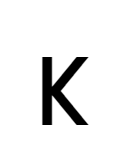
cyrl-ka = 'symmetric-touching-serifless',cv61 = 3Cyrillic Lower Ka ( к) with symmetric legs disconnected to the vertical bar, and without serifs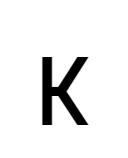
cyrl-ka = 'symmetric-connected-serifless',cv61 = 4Cyrillic Lower Ka ( к) with symmetric legs connected to the vertical bar, and without serifs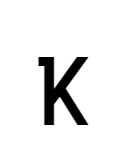
cyrl-ka = 'straight-top-left-serifed',cv61 = 5Cyrillic Lower Ka ( к) with standard shape and serifs at top left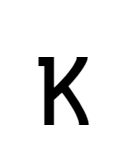
cyrl-ka = 'curly-top-left-serifed',cv61 = 6Slightly curly Cyrillic Lower Ka ( к) , like Iosevka 2.x, with serifs at top left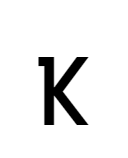
cyrl-ka = 'symmetric-touching-top-left-serifed',cv61 = 7Cyrillic Lower Ka ( к) with symmetric legs disconnected to the vertical bar, and serifs at top left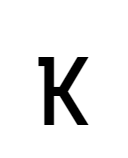
cyrl-ka = 'symmetric-connected-top-left-serifed',cv61 = 8Cyrillic Lower Ka ( к) with symmetric legs connected to the vertical bar, and serifs at top left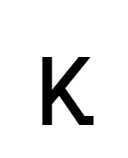
cyrl-ka = 'straight-bottom-right-serifed',cv61 = 9Cyrillic Lower Ka ( к) with standard shape and serifs at bottom right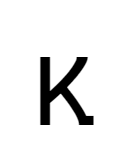
cyrl-ka = 'curly-bottom-right-serifed',cv61 = 10Slightly curly Cyrillic Lower Ka ( к) , like Iosevka 2.x, with serifs at bottom right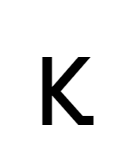
cyrl-ka = 'symmetric-touching-bottom-right-serifed',cv61 = 11Cyrillic Lower Ka ( к) with symmetric legs disconnected to the vertical bar, and serifs at bottom right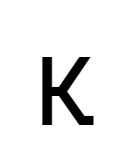
cyrl-ka = 'symmetric-connected-bottom-right-serifed',cv61 = 12Cyrillic Lower Ka ( к) with symmetric legs connected to the vertical bar, and serifs at bottom right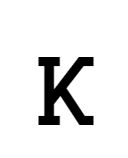
cyrl-ka = 'straight-serifed',cv61 = 13Cyrillic Lower Ka ( к) with standard shape and serifs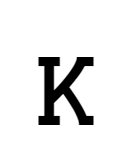
cyrl-ka = 'curly-serifed',cv61 = 14Slightly curly Cyrillic Lower Ka ( к) , like Iosevka 2.x, with serifs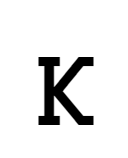
cyrl-ka = 'symmetric-touching-serifed',cv61 = 15Cyrillic Lower Ka ( к) with symmetric legs disconnected to the vertical bar, and serifs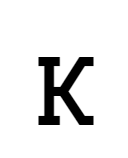
cyrl-ka = 'symmetric-connected-serifed',cv61 = 16Cyrillic Lower Ka ( к) with symmetric legs connected to the vertical bar, and serifs - Styles for
л(Cyrillic Lower El):
cyrl-el = 'straight',cv62 = 1Cyrillic Lower El ( л) with standard shape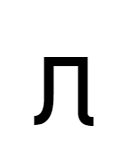
cyrl-el = 'tailed',cv62 = 2Cyrillic Lower El ( л) with tail shape - Styles for
н(Cyrillic Lower En):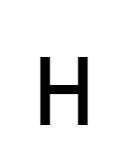
cyrl-en = 'serifless',cv63 = 1Cyrillic Lower En ( н) with standard shape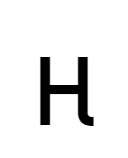
cyrl-en = 'tailed-serifless',cv63 = 2Cyrillic Lower En ( н) with tail
cyrl-en = 'top-left-serifed',cv63 = 3Cyrillic Lower En ( н) with outward serifs only at top left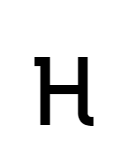
cyrl-en = 'tailed-top-left-serifed',cv63 = 4Cyrillic Lower En ( н) with tail and outward serifs only at top left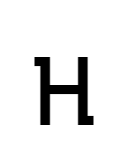
cyrl-en = 'top-left-bottom-right-serifed',cv63 = 5Cyrillic Lower En ( н) with outward serifs only at top left and bottom right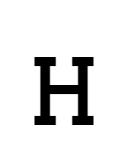
cyrl-en = 'serifed',cv63 = 6Cyrillic Lower En ( н) with full serifs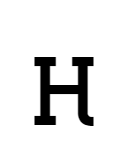
cyrl-en = 'tailed-serifed',cv63 = 7Cyrillic Lower En ( н) with tail and full serifs - Styles for
ф(Cyrillic Lower Ef):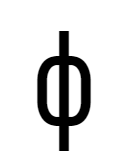
cyrl-ef = 'serifless',cv64 = 1Cyrillic Lower Ef ( ф) with standard shape and without serifs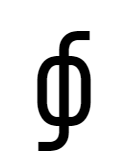
cyrl-ef = 'cursive',cv64 = 2Cyrillic Lower Ef ( ф) with cursive shape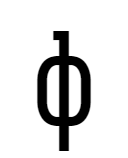
cyrl-ef = 'top-serifed',cv64 = 3Cyrillic Lower Ef ( ф) with standard shape and serif at top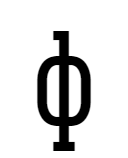
cyrl-ef = 'serifed',cv64 = 4Cyrillic Lower Ef ( ф) with standard shape and serifs at top and bottom - Styles for
ч(Cyrillic Lower Che):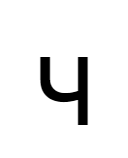
cyrl-che = 'standard',cv65 = 1Cyrillic Lower Che ( ч) with standard shape
cyrl-che = 'tailed',cv65 = 2Cyrillic Lower Che ( ч) with tail - Styles for
У(Cyrillic Capital U):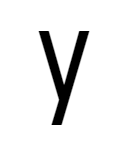
cyrl-capital-u = 'straight',cv66 = 1Cyrillic capital U ( У) that is fully straight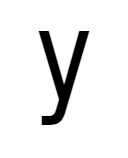
cyrl-capital-u = 'straight-turn',cv66 = 2Cyrillic capital U ( У) with straight upper and a tail turns leftward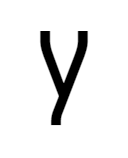
cyrl-capital-u = 'curly',cv66 = 3More curly Cyrillic capital U ( У), like Iosevka 2.x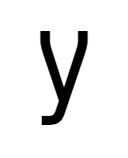
cyrl-capital-u = 'curly-turn',cv66 = 4More curly Cyrillic capital U ( У), like Iosevka 2.x, with a tail turns leftward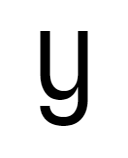
cyrl-capital-u = 'cursive',cv66 = 5Cursive-like Cyrillic capital U ( У)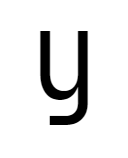
cyrl-capital-u = 'cursive-flat-hook',cv66 = 6Cursive-like Cyrillic capital U ( У) with flat terminal hook - Styles for
Я(Cyrillic Capital Ya):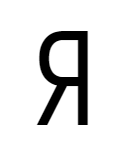
cyrl-capital-ya = 'straight',cv67 = 1Standard, straight-leg Cyrillic Capital Ya ( Я)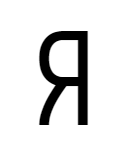
cyrl-capital-ya = 'curly',cv67 = 2Slightly curly-legged Cyrillic Capital Ya ( Я), like Iosevka 2.x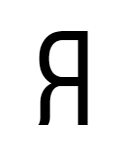
cyrl-capital-ya = 'standing',cv67 = 3Cyrillic Capital Ya ( Я) with near-vertical standing leg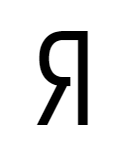
cyrl-capital-ya = 'straight-open',cv67 = 4Standard, straight-leg Cyrillic Capital Ya ( Я), with open contour at bottom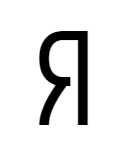
cyrl-capital-ya = 'curly-open',cv67 = 5Slightly curly-legged Cyrillic Capital Ya ( Я), like Iosevka 2.x, with open contour at bottom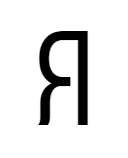
cyrl-capital-ya = 'standing-open',cv67 = 6Cyrillic Capital Ya ( Я) with near-vertical standing leg, with open contour at bottom - Styles for
я(Cyrillic Lower Ya):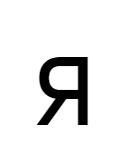
cyrl-ya = 'straight',cv68 = 1Standard, straight-leg Cyrillic Lower Ya ( я)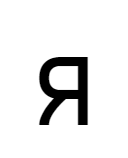
cyrl-ya = 'curly',cv68 = 2Slightly curly-legged Cyrillic Lower Ya ( я), like Iosevka 2.x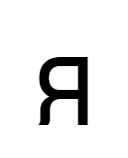
cyrl-ya = 'standing',cv68 = 3Cyrillic Lower Ya ( я) with near-vertical standing leg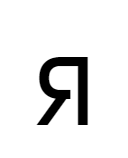
cyrl-ya = 'straight-open',cv68 = 4Standard, straight-leg Cyrillic Lower Ya ( я), with open contour at bottom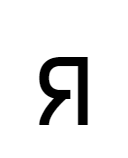
cyrl-ya = 'curly-open',cv68 = 5Slightly curly-legged Cyrillic Lower Ya ( я), like Iosevka 2.x, with open contour at bottom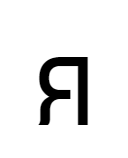
cyrl-ya = 'standing-open',cv68 = 6Cyrillic Lower Ya ( я) with near-vertical standing leg, with open contour at bottom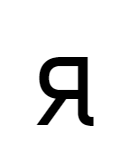
cyrl-ya = 'straight-tailed',cv68 = 7Standard, straight-leg Cyrillic Lower Ya ( я), with tail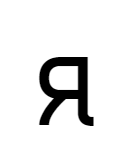
cyrl-ya = 'curly-tailed',cv68 = 8Slightly curly-legged Cyrillic Lower Ya ( я), like Iosevka 2.x, with tail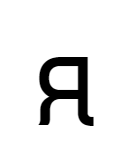
cyrl-ya = 'standing-tailed',cv68 = 9Cyrillic Lower Ya ( я) with near-vertical standing leg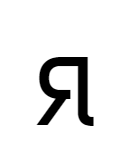
cyrl-ya = 'straight-open-tailed',cv68 = 10Standard, straight-leg Cyrillic Lower Ya ( я), with open contour at bottom and tail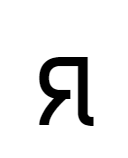
cyrl-ya = 'curly-open-tailed',cv68 = 11Slightly curly-legged Cyrillic Lower Ya ( я), like Iosevka 2.x, with open contour at bottom and tail
cyrl-ya = 'standing-open-tailed',cv68 = 12Cyrillic Lower Ya ( я) with near-vertical standing leg, with open contour at bottom and tail - Styles for
ь(Cyrillic Lower Yeri and related letters):
cyrl-yeri = 'corner',cv69 = 1Cyrillic Lower Yeri ( ь) with corner at bottom left
cyrl-yeri = 'round',cv69 = 2Cyrillic Lower Yeri ( ь) with rounded shape
cyrl-yeri = 'cursive',cv69 = 3Cyrillic Lower Yeri ( ь) with cursive shape - Styles for
ы(Cyrillic Lower Yery):
cyrl-yery = 'corner',cv70 = 1Cyrillic Lower Yery ( ы) with corner at bottom left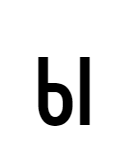
cyrl-yery = 'round',cv70 = 2Cyrillic Lower Yery ( ы) with rounded shape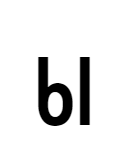
cyrl-yery = 'cursive',cv70 = 3Cyrillic Lower Yery ( ы) with cursive shape
cyrl-yery = 'corner-tailed',cv70 = 4Cyrillic Lower Yery ( ы) with corner at bottom left and tail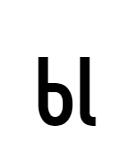
cyrl-yery = 'round-tailed',cv70 = 5Cyrillic Lower Yery ( ы) with rounded shape and tail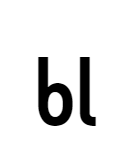
cyrl-yery = 'cursive-tailed',cv70 = 6Cyrillic Lower Yery ( ы) with cursive shape and tail - Styles for
0: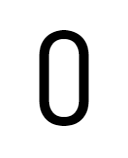
zero = 'unslashed',cv71 = 1O-like Zero ( 0)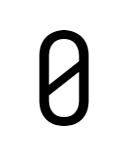
zero = 'slashed',cv71 = 2Slashed Zero ( 0)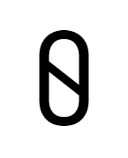
zero = 'reverse-slashed',cv71 = 3Reverse-slashed Zero ( 0)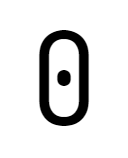
zero = 'dotted',cv71 = 4Dotted Zero ( 0)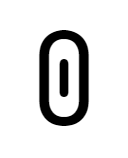
zero = 'long-dotted',cv71 = 5Long-dotted Zero ( 0) like Hack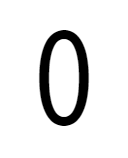
zero = 'unslashed-oval',cv71 = 6O-like Zero ( 0) but more round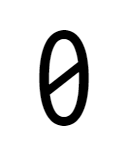
zero = 'slashed-oval',cv71 = 7Slashed Zero ( 0) but more round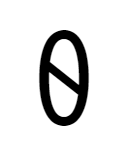
zero = 'reverse-slashed-oval',cv71 = 8Reverse-slashed Zero ( 0) but more round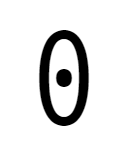
zero = 'dotted-oval',cv71 = 9Dotted Zero ( 0)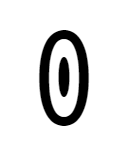
zero = 'long-dotted-oval',cv71 = 10Long-dotted Zero ( 0) like Hack - Styles for
1: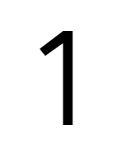
one = 'no-base',cv72 = 11without bottom serif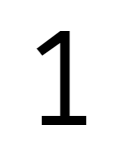
one = 'base',cv72 = 21with bottom serif
one = 'line',cv72 = 31drawn just like a straight line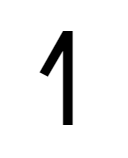
one = 'no-base-long-top-serif',cv72 = 41without bottom serif and with a long top serif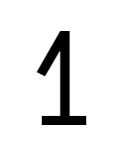
one = 'base-long-top-serif',cv72 = 51with bottom serif and a long top serif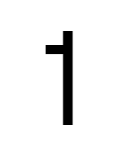
one = 'no-base-flat-top-serif',cv72 = 61without bottom serif and with a flat top serif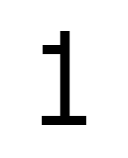
one = 'base-flat-top-serif',cv72 = 71with bottom serif and a flat top serif - Styles for
2: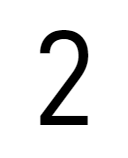
two = 'straight-neck',cv73 = 12with straight neck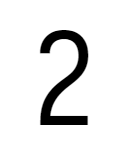
two = 'curly-neck',cv73 = 22with curly neck - Styles for
3: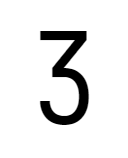
three = 'flat-top',cv74 = 1Flat top 3(Like Museo Sans / Montserrat)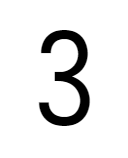
three = 'two-arcs',cv74 = 2Arched top 3 - Styles for
4: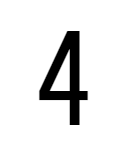
four = 'closed',cv75 = 14with closed contour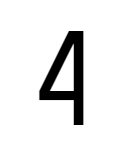
four = 'closed-non-crossing',cv75 = 24with closed contour but the horizontal bar does not overflow the vertical bar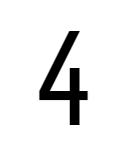
four = 'semi-open',cv75 = 34with semi-open contour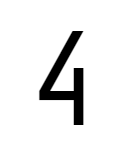
four = 'semi-open-non-crossing',cv75 = 44with semi-open contour but the horizontal bar does not overflow the vertical bar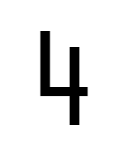
four = 'open',cv75 = 54with open contour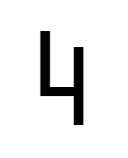
four = 'open-non-crossing',cv75 = 64with open contour but the horizontal bar does not overflow the vertical bar - Styles for
5: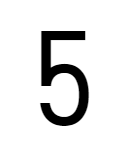
five = 'vertical-upper-left-bar',cv76 = 15with a vertical upper-left bar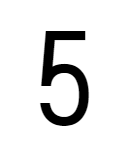
five = 'oblique-upper-left-bar',cv76 = 25with an oblique upper-left bar - Styles for
6: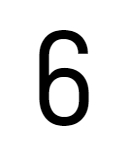
six = 'closed-contour',cv77 = 16with a more closed contour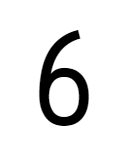
six = 'open-contour',cv77 = 26with a more open contour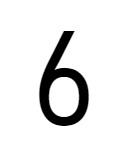
six = 'straight-bar',cv77 = 36with a straight bar - Styles for
7: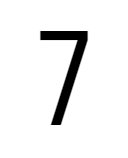
seven = 'straight-serifless',cv78 = 17with straight stem and without serif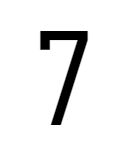
seven = 'straight-serifed',cv78 = 27with straight stem and initial serif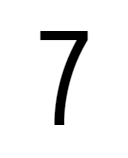
seven = 'bend-serifless',cv78 = 37with bend stem and without serif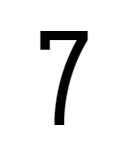
seven = 'bend-serifed',cv78 = 47with bend stem and initial serif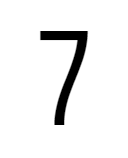
seven = 'curly-serifless',cv78 = 57with curly stem and without serif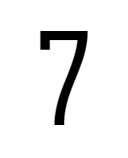
seven = 'curly-serifed',cv78 = 67with curly stem and initial serif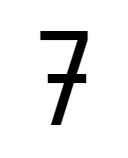
seven = 'straight-crossbar',cv78 = 77with straight stem and crossbar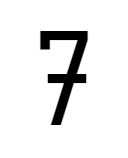
seven = 'straight-crossbar-serifed',cv78 = 87with straight stem, crossbar and initial serif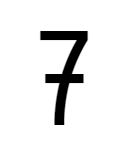
seven = 'bend-crossbar',cv78 = 97with bend stem and crossbar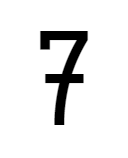
seven = 'bend-crossbar-serifed',cv78 = 107with bend stem, crossbar and initial serif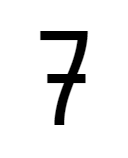
seven = 'curly-crossbar',cv78 = 117with curly stem and crossbar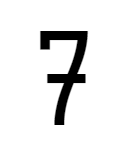
seven = 'curly-crossbar-serifed',cv78 = 127with curly stem, crossbar and initial serif - Styles for
8: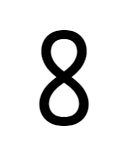
eight = 'crossing',cv79 = 18with crossing middle part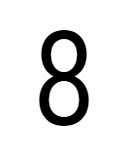
eight = 'two-circles',cv79 = 28looks like two circles joined together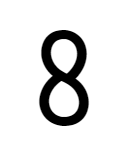
eight = 'crossing-asymmetric',cv79 = 38looks asymmetric crossing middle part - Styles for
9: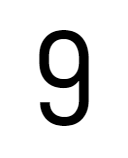
nine = 'closed-contour',cv80 = 19with a more closed contour
nine = 'open-contour',cv80 = 29with a more open contour
nine = 'straight-bar',cv80 = 39with a straight bar - Styles for
~:
tilde = 'high',cv81 = 1Higher tilde ~
tilde = 'low',cv81 = 2Lower tilde ~ - Styles for
*: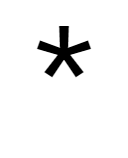
asterisk = 'penta-high',cv82 = 1Higher five-pointed asterisk *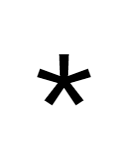
asterisk = 'penta-low',cv82 = 2Lower five-pointed asterisk *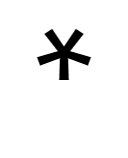
asterisk = 'flip-penta-high',cv82 = 3Higher five-pointed and turned asterisk *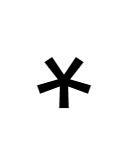
asterisk = 'flip-penta-low',cv82 = 4Lower five-pointed and turned asterisk *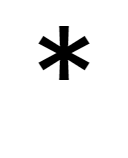
asterisk = 'hex-high',cv82 = 5Higher six-pointed asterisk *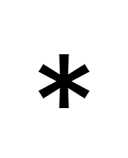
asterisk = 'hex-low',cv82 = 6Lower six-pointed asterisk *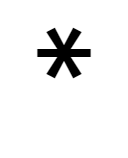
asterisk = 'turn-hex-high',cv82 = 7Higher turned six-pointed asterisk *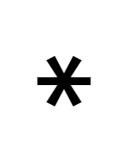
asterisk = 'turn-hex-low',cv82 = 8Lower turned six-pointed asterisk * - Styles for
_:
underscore = 'above-baseline',cv83 = 1Extra-high _, placed right below baseline
underscore = 'high',cv83 = 2Higher underscore _, placed right below baseline
underscore = 'low',cv83 = 3Lower underscore _, placed right above descender line - Styles for
¶:
paragraph-sign = 'high',cv84 = 1Higher paragraph sign 
paragraph-sign = 'low',cv84 = 2Lower paragraph sign ¶ - Styles for
^:
caret = 'high',cv85 = 1Higher circumflex ^
caret = 'medium',cv85 = 2Lower circumflex ^
caret = 'low',cv85 = 3Lower circumflex ^ - Styles for
(,):
paren = 'normal',cv86 = 1Parenthesis with normal contour 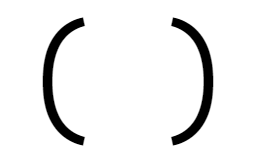
paren = 'large-contour',cv86 = 2Parenthesis with larger contour, like that in Monaco 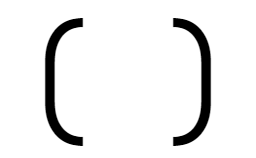
paren = 'flat-arc',cv86 = 3Parenthesis with flat arc, like that in JetBrains Mono - Styles for
{,}: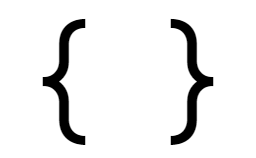
brace = 'straight',cv87 = 1More straight braces 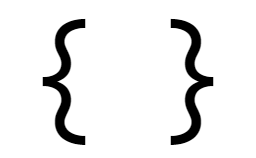
brace = 'curly',cv87 = 2More curly braces 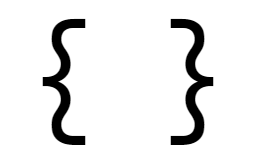
brace = 'curly-flat-boundary',cv87 = 3Curly braces with flat boundary shape - Styles for
#: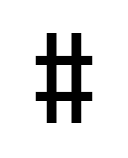
number-sign = 'upright',cv88 = 1Number sign with vertical bars 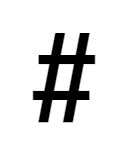
number-sign = 'slanted',cv88 = 2Number sign with slanted bars 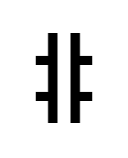
number-sign = 'upright-open',cv88 = 3Number sign with vertical bars and open inner 
number-sign = 'slanted-open',cv88 = 4Number sign with slanted bars and open inner 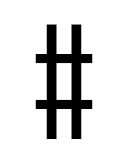
number-sign = 'upright-tall',cv88 = 5Number sign with vertical bars and taller than digits 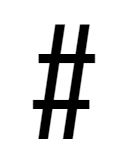
number-sign = 'slanted-tall',cv88 = 6Number sign with slanted bars and taller than digits 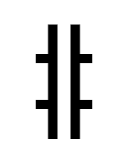
number-sign = 'upright-open-tall',cv88 = 7Number sign with vertical bars, open inner, and taller than digits 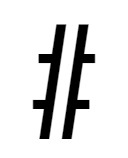
number-sign = 'slanted-open-tall',cv88 = 8Number sign with slanted bars, open inner, and taller than digits - Styles for
&: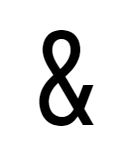
ampersand = 'closed',cv89 = 1Ampersand ( &) with a closed contour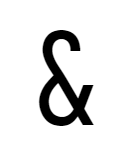
ampersand = 'upper-open',cv89 = 2Ampersand ( &) with an open contour at upper half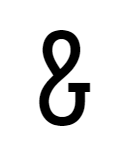
ampersand = 'lower-open',cv89 = 3Ampersand ( &) with an open contour at lower half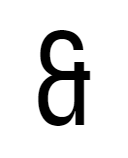
ampersand = 'et-toothed',cv89 = 4Ampersand ( &) drawn like a ligature of Ɛ and t with tooth
ampersand = 'et-toothless-corner',cv89 = 5Ampersand ( &) drawn like a ligature of Ɛ and t without tooth (corner)
ampersand = 'et-toothless-rounded',cv89 = 6Ampersand ( &) drawn like a ligature of Ɛ and t without tooth (rounded)
ampersand = 'flat-top',cv89 = 7Ampersand ( &) drawn with a flat top - Styles for
@:
at = 'threefold',cv90 = 1The three-fold At symbol ( @)
at = 'fourfold',cv90 = 2The traditional, four-fold At symbol ( @)
at = 'short',cv90 = 3The shorter, Fira-like At symbol ( @)
at = 'threefold-tall',cv90 = 4The three-fold At symbol ( @) with taller outline
at = 'fourfold-tall',cv90 = 5The traditional, four-fold At symbol ( @) with taller outline - Styles for
$: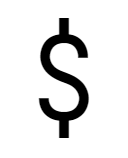
dollar = 'open',cv91 = 1Dollar symbol with open contour 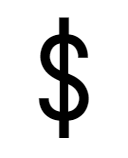
dollar = 'through',cv91 = 2Dollar symbol with strike-through vertical bar 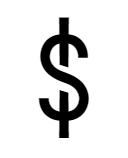
dollar = 'interrupted',cv91 = 3Dollar symbol with strike-through vertical bar 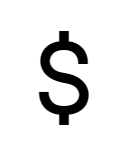
dollar = 'open-cap',cv91 = 4Dollar symbol with open contour, not exceeding baseline and ascender 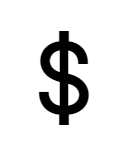
dollar = 'through-cap',cv91 = 5Dollar symbol with strike-through vertical bar, not exceeding baseline and ascender 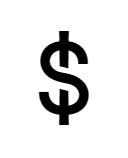
dollar = 'interrupted-cap',cv91 = 6Dollar symbol with strike-through vertical bar, not exceeding baseline and ascender - Styles for
¢: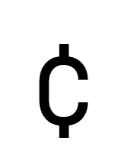
cent = 'open',cv92 = 1Cent sign ( ¢) with open contour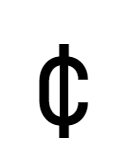
cent = 'through',cv92 = 2Cent sign ( ¢) with vertical bar all through thecpart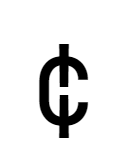
cent = 'bar-interrupted',cv92 = 3Cent sign ( ¢) with vertical bar breaks at center - Styles for
%: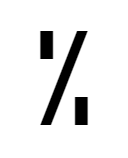
percent = 'dots',cv93 = 1Percent %with rectangular dots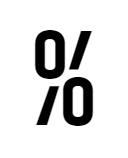
percent = 'rings-segmented-slash',cv93 = 2Percent %with rings and segmented slash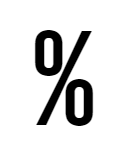
percent = 'rings-continuous-slash',cv93 = 3Percent %with rings and continuous bar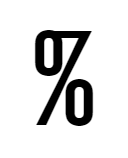
percent = 'rings-continuous-slash-also-connected',cv93 = 4Percent %with rings and continuous bar and the slash in%is also connected to the top-left ring - Styles for
|: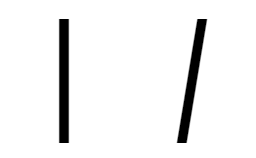
bar = 'natural-slope',cv94 = 1Bar punctuations ( |) has a natural slope under italics and oblique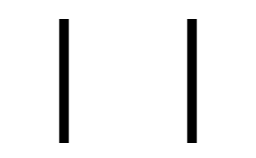
bar = 'force-upright',cv94 = 2Bar punctuations ( |) is forced upright under italics and oblique - Styles for
<=,>=: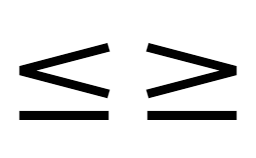
lig-ltgteq = 'flat',cv95 = 1The lower bar of <=and>=ligation is flat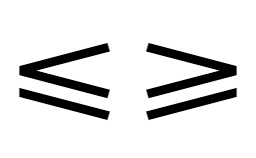
lig-ltgteq = 'slanted',cv95 = 2The lower bar of <=and>=ligation is slanted - Styles for
':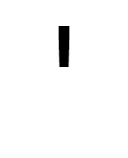
ascii-single-quote = 'straight',cv96 = 1Show ASCII quote ( ") as short vertical straight bar.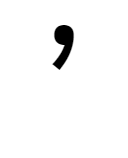
ascii-single-quote = 'raised-comma',cv96 = 2Show ASCII quote ( ") as raised comma. - Styles for
`: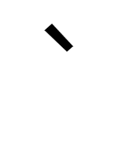
ascii-grave = 'straight',cv97 = 1Show ASCII grave ( `) as short diagonal straight bar.
ascii-grave = 'raised-inverse-comma',cv97 = 2Show ASCII grave ( `) as raised comma.
ascii-grave = 'raised-turn-comma',cv97 = 3Show ASCII grave ( `) as raised turned comma, identical to curly open single quote symbols (U+2018). - Styles for
?:
question = 'smooth',cv98 = 1Smooth question mark ( ?)
question = 'corner',cv98 = 2Question mark ( ?) with a corner at middle
question = 'corner-flat-hooked',cv98 = 3Question mark ( ?) with a corner at middle and flat hook - Styles for
.,,:;(Dot and Comma shape in punctuations and symbols):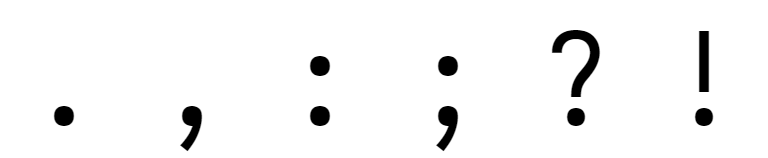
punctuation-dot = 'round',cv99 = 1Small punctuations (like .,,) use round dots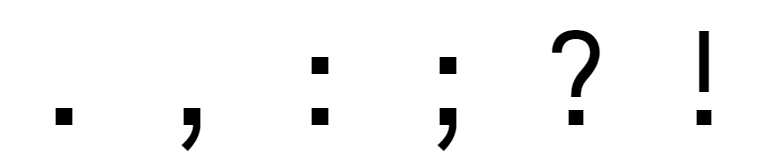
punctuation-dot = 'square',cv99 = 2Small punctuations (like .,,) use square dots
- Default digit form:


Configuring Weights, Widths and Slopes
Subsection weights is used to change the weight grades that the custom family needs. It is a dictionary of either strings formatted in default.<weight> format, meaning reusing a default weight grade, or sub-objects with properties:
shape: Number, configures the weight grade of the glyphs' shapes.menu: Integer, configures the weight grade used when naming fonts.css: Integer, configures the weight grade used in web font CSS.
Subsection widths is used to change the width grades that the custom family needs. It is a dictionary of either strings formatted in default.<width> format, meaning reusing a default width grade, or sub-objects with properties:
shape: Number, configures the width of the glyphs' shapes, measured in 1/1000 em.menu: Integer, configures the width grade used when naming fonts. The valid values are1to9, inclusive.css: String, configures the font-stretch value used in web font CSS.
Subsection slopes is used to change the slope angles and grades that the custom family needs. It is a dictionary of either strings formatted in default.<slope> format, meaning reusing a default slope grade, or sub-objects with properties:
angle: Number, configures the slope angle in degrees. The valid vales are0to15, inclusive.shape: String fromupright,italicoroblique. Configures the slope used for variant selection.menu: String fromupright,italicoroblique. Configures the slope grade used when naming fonts.css: String fromnormal,italicoroblique. Configures the CSS font-style value.
Subsection slopes is a simple string-to-string dictionary maps slopes (upright, italic or oblique) to CSS font-style values, represented in string.
Compatibility Ligatures
Certain software, notably Emacs, relies on pre-encoded ligatures instead of OpenType to provide ligations. Iosevka could be configured with additional subsection compatibility-ligatures, being an array of records with following fields:
unicode: The PUA code point being assigned to.featureTag: The feature tag to compute ligations.sequence: The source character sequence.
A sample of compatibility ligature config is:
[[buildPlans.iosevka-custom.compatibility-ligatures]]
unicode = 57600 # 0xE100
featureTag = 'calt'
sequence = '<*>'
Metric Override
Subsection metric-override provides ability to override certain metric values, if you reallly want to. Adding this section is strongly discouraged as it may introduce broken geometry or broken shapes.
| Property | Unit | Default Value | Meaning |
|---|---|---|---|
cap |
emu | 735 | Height of H. |
xheight |
emu | 530 | Height of x. |
sb |
emu | (varies, 60 for Regular) | Width of common side-bearings. |
accentWidth |
emu | 200 | Width of accent marks. |
accentClearance |
emu | 72 | Vertical clearance of accent marks to the base. |
accentHeight |
emu | 176 | Height of accent marks. |
accentStackOffset |
emu | 220 | Offset height of accent mark stack. |
dotSize |
emu | (varies, 125 for regular) | Size of dots in diacritic marks. |
periodSize |
emu | (varies, 140 for regular) | Size of dots in period. |
leading |
emu | 1250 | Built-in line height. |
symbolMid |
emu | 340 | Height of the center of hyphen (-). |
parenSize |
emu | 966 | Height of Parentheses. |
winMetricAscenderPad |
emu | 0 | Additional pad for Win metrics’ ascender to avoid clipping in legacy Windows applications. |
winMetricDescenderPad |
emu | 0 | Additional pad for Win metrics’ descender to avoid clipping in legacy Windows applications. |
powerlineScaleX, powerlineScaleY |
(ratio) | 1 | X and Y scale of Powerline glyphs. |
powerlineShiftX, powerlineShiftY |
emu | 0 | X and Y shift of Powerline glyphs. |
onumZeroHeightRatio |
(ratio) | 1.145 | Ratio of height of 0 under onum feature, to the height of x. |
The values of each item could be either a number, or a string representing an expression so that it could be different for different instance fonts, or depending on default values. The syntax of valid expressions are:
Expression -> Term (('+' | '-') Term)*
Term       -> Factor (('*' | '/') Factor)*
Factor     -> ('+' | '-')* Primitive
Primitive  -> Literal
            | Call
            | Binding
            | Group
            | List
Literal    -> ['0'..'9']+ ('.' ['0'..'9']+)?
Identifier -> ['A'..'Z', 'a'..'z', '_']+
Call       -> Identifier '(' Expression (',' Expression)* ')'
List       -> Identifier '[' Expression (',' Expression)* ']'
Binding    -> Identifier
Valid identifiers include:
weight: being the weight grade;width: being the characters' unit width, measured in em-units;slopeAngle: being the slope angle in degrees;- Default value of all overridable metrics, prefixed with
default_, i.e., defaultcapvalue will be accessable thorughdefault_cap.
Valid functions include:
blend(x, [x1, y1], [x2, y2], ...): Perform a smooth interpolation through data pairs [x1, y1], [x2, y2], ..., against parameter x.
For example, the following configuration:
[buildPlans.iosevka-custom.metric-override]
leading = 1500
sb = 'default_sb * 1.0625 + 15'
dotSize = 'blend(weight, [100, 50], [400, 125], [900, 180])'
will:
- Override line height to
1500em-unit; - Override the sidebearing value by its value multiplied by
1.0625then added with15. - Override the dot size by a interpolation against weight: at thin (
100) being50, at regular (400) being125, and at heavy (900) being180.
Sample Configuration
A sample configuration could be found at private-build-plans.sample.toml.
TTC Building
It is possible to create a customized TTC build by using the following method:
- Add a collect plan into
private-build-plans.toml, with afromfield containing all the TTF groups it needs:
[collectPlans.iosevka-custom]
from = ["iosevka-custom1", "iosevka-custom-2"]
- Run build with the following command:
npm run build -- ttc::iosevka-custom: Create TTCs from collectioniosevka-custom; The file will be saved intodist/.ttc.npm run build -- super-ttc::iosevka-custom: Create a single-file TTC from collectioniosevka-custom; The file will be saved intodist/.super-ttc.
For Chinese and Japanese users...
Mirrors
- TUNA (CN): https://mirrors.tuna.tsinghua.edu.cn/github-release/be5invis/Iosevka
- NJU (CN): https://mirrors.nju.edu.cn/github-release/be5invis/Iosevka
